
Get into more stores, cut stales and settle every route the same day.
Small food and beverage brands and distributors lose money between the dock and the deposit: chain stores they can't get into, orders built on guesswork, product that comes back stale and route days that take hours to close out. RoutePortalHQ is the direct store delivery solution we tailor to your routes, on the phones your drivers already carry, with you shaping what comes next.

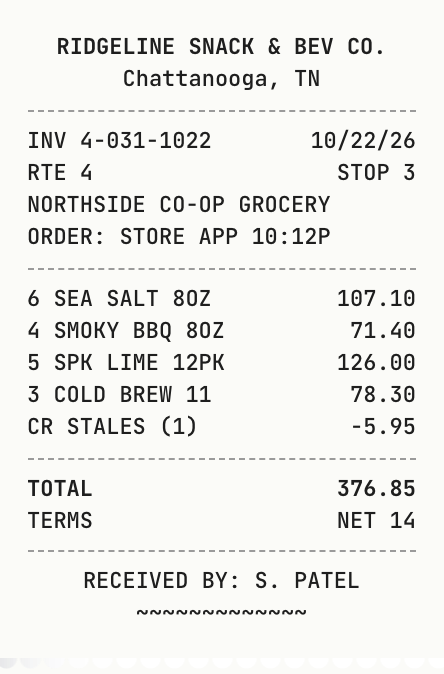
- Your waystores sign on the phone or on paper, with DEX only where a chain needs it
- Same dayroute settlement, with any difference explained
- 0 barsof signal needed to finish a stop
- $0per extra driver, office user or store
Money leaks out between the dock and the deposit
Small food and beverage brands and distributors running 1 to 10 routes tell us the same story: chain stores they can't get into, orders built on guesswork, stales that eat the margin, and route days that take until evening to close out.
-
The challenge
Chain grocery stores want DEX
Most chain grocery stores check in direct deliveries over DEX. The software that does it is usually quote-only, with enterprise price tags and long rollouts.
How we solve itSign on the phone or paper, with DEX when a chain needs it
Most stores simply sign on the driver's phone or a printed invoice. For chains that require DEX, turn it on and send the delivery from the phone or a rugged handheld, and we help you set up each chain.
-
The challenge
Orders built on guesswork
Drivers guess what each store needs, so some shelves run empty while others fill up with product that goes stale.
How we solve itSuggested orders that say why
A starting order for every store from what it sold, what was on the shelf and what came back stale, ready for your office to approve.
-
The challenge
Stales and shrink eat the margin
Out-of-date product gets written off, and nobody can see which stores and items keep coming back.
How we solve itStales tracked and acted on
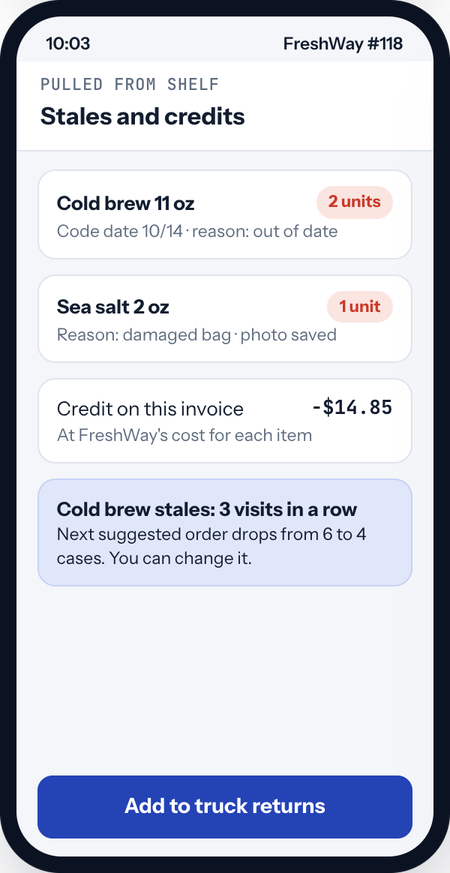
Pulls are logged with a reason and a photo, credited on the invoice, and repeat stales lower the next order automatically.
-
The challenge
Route days that never close
Cash, checks, paper tickets and truck counts get reconciled by hand, often late into the evening, and differences are hard to explain.
How we solve itSame-day settlement
Truck stock, cash and checks are checked against what the day should have produced, with any difference shown line by line.
Highly customizable, with you shaping the roadmap
No two distributors work the same way, so we don't ask you to change how you work. We tailor RoutePortalHQ to your operation, build what's missing, and as we go, you have a real say in what comes next.
Set up the way you work
Your workflows, templates, wording, brand and settings. We configure RoutePortalHQ around your operation instead of the other way around.
Built for your specific needs
Need something that isn't there yet, a custom report, a special workflow or a connection to a tool you rely on? We design and build it with you.
You influence the roadmap
A named contact, regular check-ins and a direct line into what we build next. Your priorities help decide what comes first.
One route day, from the dock to the deposit
Follow Route 4 at Ridgeline Snack & Beverage, a sample distributor with six routes, through one day. Pre-sell, route sales or both: each store is set up the way you serve it.
The office
A web app for the owner, office and warehouse.
- Suggested orders and routes
- Load sheets and settlement
- Stores, products and price books
- Sales, stales and profit
The truck
An iPhone and Android app for drivers, reps and merchandisers.
- Load by the sheet
- Invoices, signatures and payment at the door
- Stales, shelf photos and credits
- Works with no signal at all
The store
A reorder link for store managers, with no app or password.
- Their own prices and promotions
- Next visit date
- A note for the driver
- Orders join the next visit
The night before: plan the orders and the route
A suggested order for every store on tomorrow's routes, ready for your office to review in minutes, and stops put in the best order around each store's receiving hours.
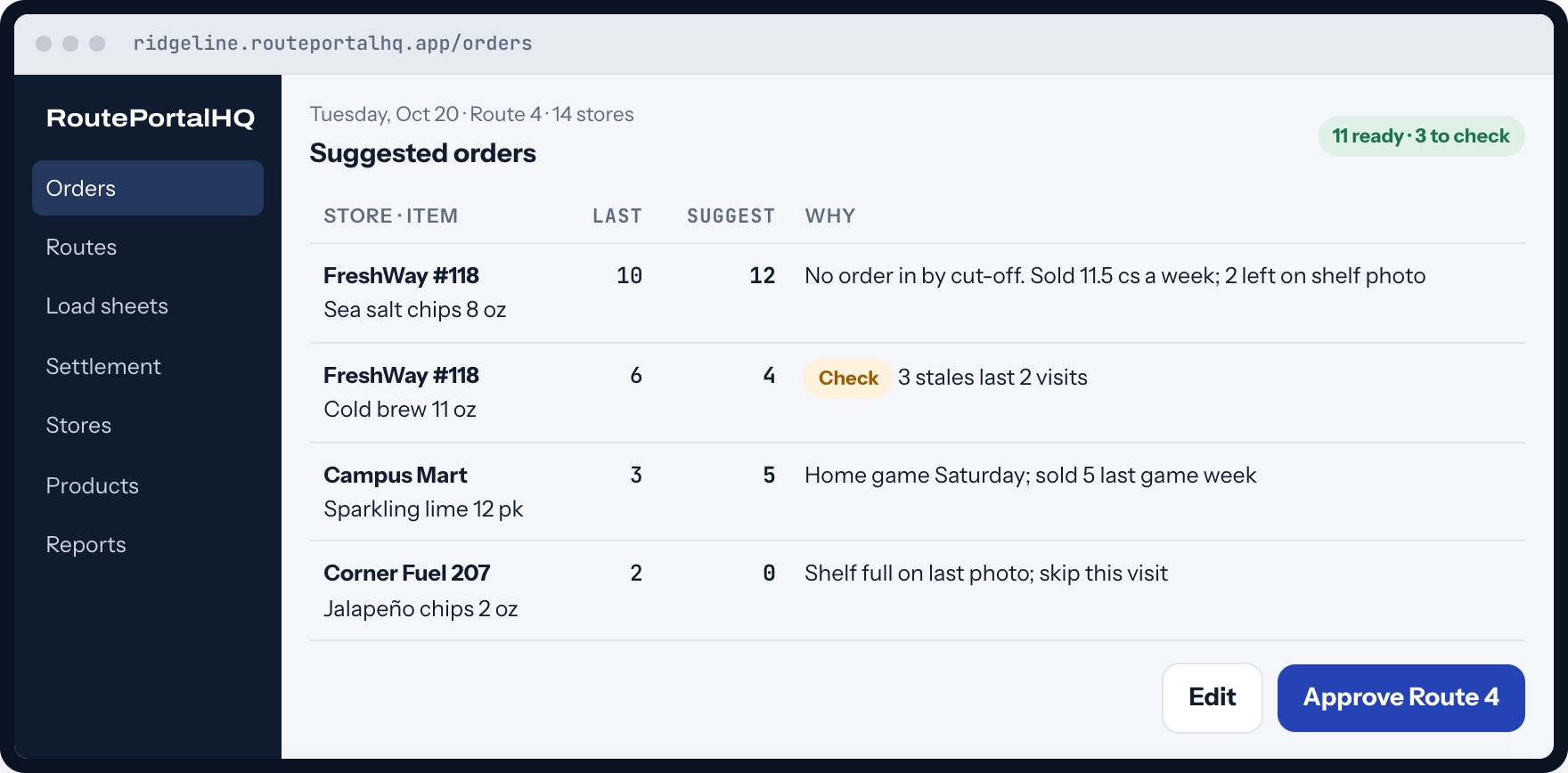
- Every suggestion says why. Built from what the store sold, what the last shelf photo showed and what came back stale.
- Unusual lines are flagged. Anything that moves a lot from last visit is marked Check for a person to look at.
- Routes around receiving windows. Stops are ordered around each store's hours and traffic, and drivers navigate in their usual maps app.
5 AM: load the truck by the sheet
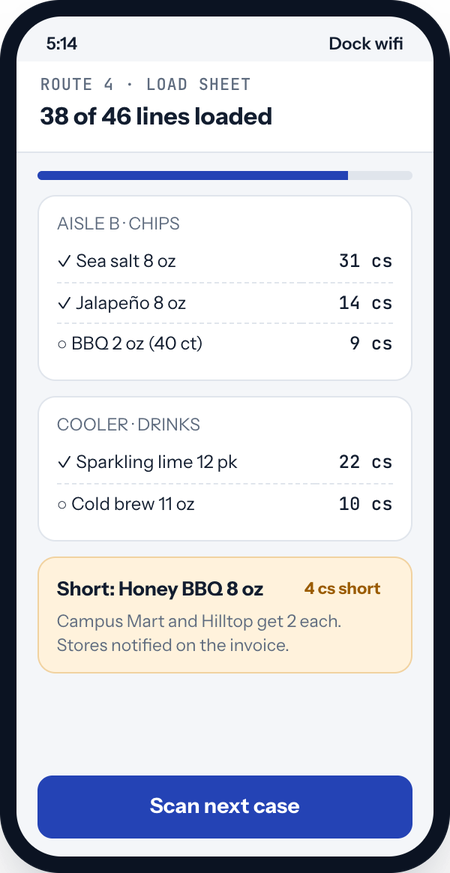
Approved orders become one load sheet per route, grouped by aisle. The driver checks cases onto the truck, and the truck's stock starts counting from there.
Extra stock for route sales
Set how many extra cases ride each truck for stores that buy off the truck.
Shorts flagged before the truck leaves
If the warehouse is short, the app splits what's there and notes it on the affected invoices.
Lot and date codes
Kept for perishables, so stales and recalls trace back to the load.
Why it mattersSettlement can only be accurate if the day starts with an accurate truck.
At the store: deliver, check the shelf and get paid
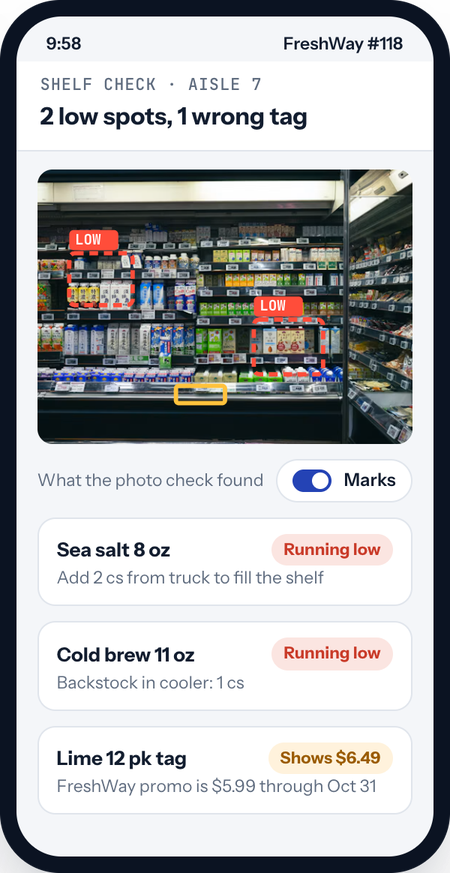
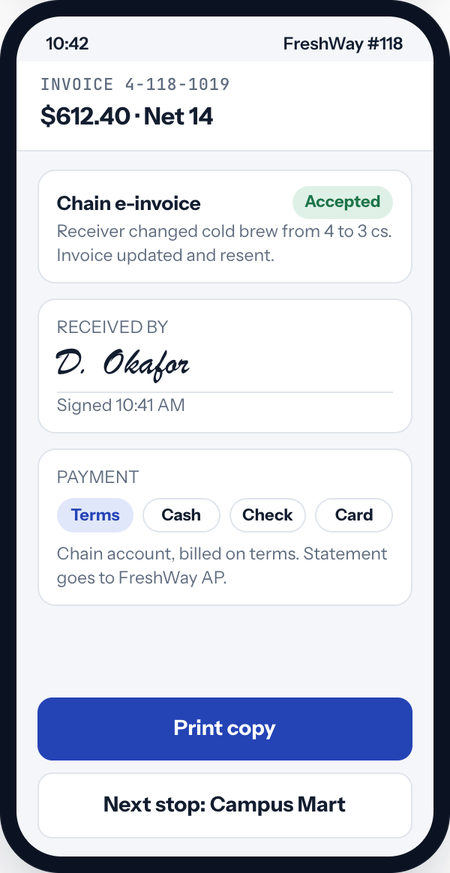
At each stop the driver adjusts the order, pulls stales, snaps the shelf and takes payment, with each chain's or store's own prices and promotions applied. The store signs on the driver's phone or a printed invoice, or checks in over DEX at chains that require it. All of it works in a back room with no signal.
Back at the warehouse: settle the route the same day
The driver counts what's left and turns in cash and checks. RoutePortalHQ compares that with what the day should have produced, explains any difference and posts the day to your accounting software once the office signs off.
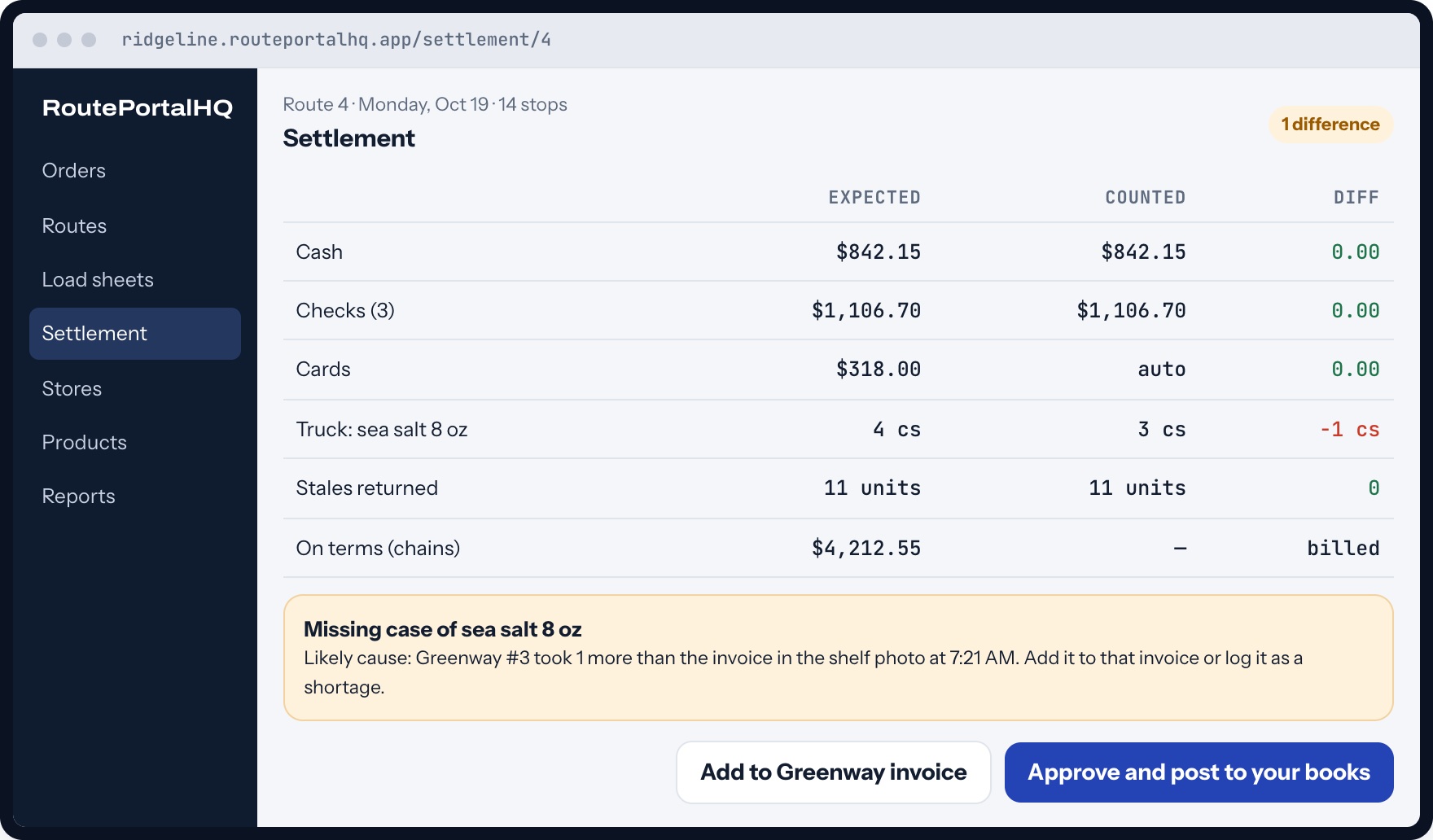
- One check-in. Truck count, returns and stales together, in minutes.
- Differences explained. Every case is tracked from load to sale, so a missing one points to the stop where it likely went.
- Posted to your books. Invoices, payments and credits go to your accounting software after the office approves.
Between visits: let stores reorder and see what sells
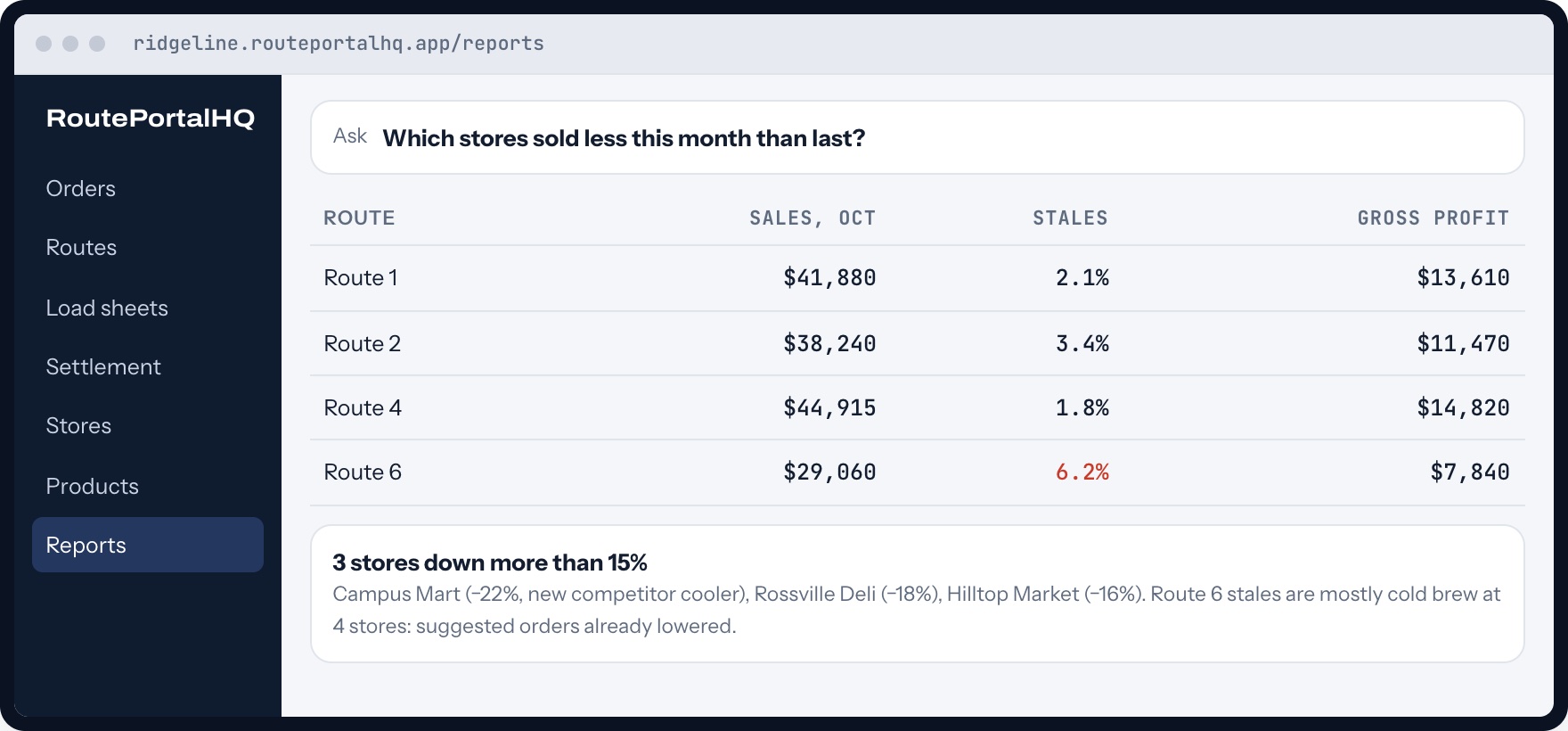
Store managers reorder from a text link with their own prices. You see sales, stales and profit by store, route and product, and get a heads-up on stores that are slipping.

Ready for chain grocery stores, when you are
DEX is completely optional. Most stores simply sign for the delivery on the driver's phone or on a printed invoice, and that's all you need. But many chain grocery stores check in direct deliveries over DEX and won't take your product without it. When you're ready for those chains, turn DEX on for just those stores, without an enterprise price tag.
- Optional, store by store. Turn it on only for the chains that require it. Every other store signs on the phone or on paper.
- From the phone or a rugged handheld, with a small plug-in adapter or cable we supply at cost.
- Store changes come back and update the invoice automatically.
- Help with each chain's setup: we work through the IDs, item lists and testing each chain asks for, alongside you.
- A test mode that logs every exchange, so issues are solved quickly.
It suggests. You decide.
AI does the reading, explaining and spotting, while plain, checkable math sets the numbers. Nothing changes an order without your office's approval.
- Suggested orders from sales, shelf photos and stales, each with a one-line reason.
- Shelf photo check that finds low spots, wrong tags and missing items for the driver to confirm.
- Ask in plain English, like "which stores sold less this month than last?", and see the answer and how it was worked out.
- A nightly owner note on stores that are slipping and stales hot spots.
Between the basic route apps and the enterprise systems
Basic route apps charge per user and leave out DEX for the chains that need it. Enterprise DSD systems have it, but come with quotes, licenses and long rollouts. RoutePortalHQ is built for brands and distributors running 1 to 10 routes.
| Basic route apps | Enterprise DSD systems | RoutePortalHQ | |
|---|---|---|---|
| Proof of delivery | Signature, sometimes | Signature and DEX | Signature on the phone or paper, plus optional DEX |
| Price | Per user, plus setup fees | Quotes and licenses | One flat price by route count |
| Orders | Par levels at best | Powerful, complex | Suggested orders that say why |
| Shelf photos | A separate product | A separate module | Included, with gaps and tags found for you |
| No signal | Sync problems are common | Varies | Every stop works offline |
| Getting started | Onboarding fees | Months of rollout | Free setup, first route in about a week |
| Your say | A feature request form | A feature request form | You help decide what we build next |
Your first route in about a week
We set RoutePortalHQ up around your stores, products and routes, and stay with you long after launch.
- Send us your listsYour product list, store list and price sheets, in whatever form you have them.
- We set it up for freeProducts, stores, price books, promotions, routes and receiving windows, imported and checked.
- Hardware, if you need itPocket printers for paper invoices, and DEX adapters only if you serve chains that require them, at cost and paired before they ship.
- Run your first routeWe ride along on day one. If you need DEX for certain chains, we work through each one's setup with you.
Why you can count on us
We've designed and built websites, client portals and custom applications for small businesses since 2006, and we stay with our clients long after launch. See our work.
- Month to month, with no contract
- Free setup and import
- Export all of your data any time
- A named contact who knows your routes
Your money and your routes, handled carefully
Your data stays yours
Every distributor's data is kept separate, and you can export all of it any time.
Every change logged
Settlement approvals, credit overrides and price changes are recorded with who and when. Drivers can't edit prices.
Lost phone, no problem
Data on the phone is encrypted, and the office can sign a lost or retired device out remotely.
Simple sign-in for drivers
Drivers sign in once per phone and then use a PIN, so shared handhelds just work.
Store links done right
Each store's reorder link is private to that store, expires, and can be turned off at any time.
Backed up, in the US
It runs on Google Cloud in the US with backups, and the driver app keeps working even if the office is offline.
One flat price, every driver included
Your plan is set by how many routes you run, nothing else. Every driver, office user and store manager is included, with no setup fee and no year-long contract. Talk to us and we'll recommend the plan that fits.
Starter
$
For 1 to 3 routes.
- Every feature on this page
- Suggested orders and route planning
- Optional DEX at up to 3 grocery chains
- Shelf photo checks each month
- Accounting software sync
Growth
$$
For 4 to 10 routes.
- Everything in Starter
- Optional DEX at every chain you deliver
- More shelf photo checks
- Rugged handhelds as well as phones
- A named onboarding contact
More than 10 routes
Let's talk
For larger fleets.
- Everything in Growth
- Set up around how your operation runs
- A flat monthly price for your fleet
Contact us to talk through your routes. The value is significant, and the price is surprisingly low. Pocket printers and optional DEX adapters are sold at cost.
What distributors ask first
Can RoutePortalHQ be customized for our operation?
Yes. It's highly customizable. We set it up around your stores, products, price books and routes, build the features your operation needs, and you have a real say in our roadmap, with a named contact and regular check-ins.
Do my drivers need special handhelds?
No. The driver app runs on the iPhones and Android phones your drivers already carry, with a small Bluetooth printer for paper invoices. Rugged handhelds are supported too.
Do we have to use DEX?
No. DEX is completely optional. Stores can sign for a delivery right on the driver's phone or on a printed invoice. Turn DEX on only for the chain grocery stores that require it, if and when you deliver to them.
How does DEX work with a phone?
DEX is how chain grocery stores check in a delivery. The driver connects a small adapter or cable to the store's receiving port, and the invoice is sent from the device. Any change the receiver makes comes back and updates the invoice. We supply adapters at cost and help you with each chain's setup.
What if there's no signal in the store?
Every step of a stop works offline: orders, stales, signatures, payments and printing. The phone syncs when it reconnects, and the office sees the stop then.
Does it replace our accounting software?
No. RoutePortalHQ handles the route side and posts invoices, payments and credits to your accounting software, which stays your books.
Can we do pre-sell and route sales together?
Yes. Each store is set to pre-sell, route sales or both. Pre-sold orders go on the load sheet, and extra cases ride the truck for route sales.
Does the AI change our orders on its own?
No. Quantities come from plain, checkable math on your sales, shelf photos and stales. The AI explains each suggestion and flags unusual lines, and your office approves every order.
How long does it take to switch?
Send us your product list, store list and price sheets. We set them up for free, and most distributors can run their first route within about a week.
How much does it cost?
There are two plans set by how many routes you run, with every driver, office user and store included, and a custom plan for more than 10 routes. Contact us and we'll recommend the right one. The value is significant, and the price is surprisingly low.