
Field service management software for HVAC, plumbing and electrical shops.
Book the call. Send the right tech. Get paid at the door. FieldPortalHQ runs your office, your trucks and your customer texts as one system, with one price for your whole team. And because we build it with you, it works the way your shop already does.
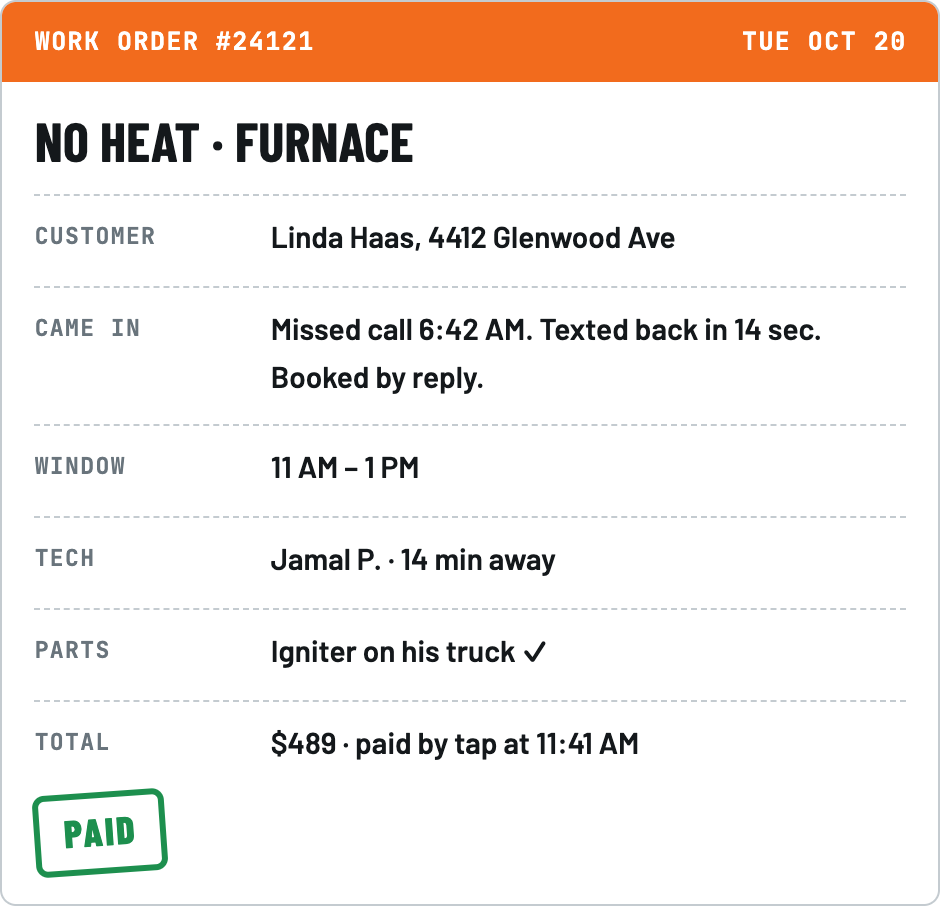
- 30 secfor a missed caller to get a text with real times to book
- Unlimitedusers, so summer hires and office staff cost nothing extra
- 0 barsof signal needed for a tech to finish the whole job
- 1system for the office, the trucks and your customers
One system for the office, the truck and the customer
Most shops juggle a scheduling app, an answering service, a whiteboard and a spreadsheet. FieldPortalHQ puts it all in one place, for shops with 1 to 20 techs.
The office
A web app for the owner, dispatcher and office manager.
- Every call, text and web lead in one inbox
- The dispatch board, with the best tech suggested
- Customers, equipment and your price list
- Invoices and the numbers that matter
The truck
An iPhone and Android app for every tech.
- Today's jobs, history and gate codes
- Quotes with options, signed on the phone
- Tap to pay before packing up
- Works with no signal at all
The customer
Texts and links that work on any phone, with no app or account.
- Book a time by replying 1, 2 or 3
- "On my way" with the tech's photo
- Approve a quote and pay from a link
- Leave a review in one tap
What connects them: every call, reply and tap moves the job forward, with nobody re-typing it.
- A call is missed. The caller gets a text with three real times.
- They reply "2". The job lands on the board in that window.
- The best tech is suggested, and the dispatcher sends them with one click.
- The tech taps On my way. The customer gets their photo and arrival time.
The call: answer every one, even from a ladder
Today, a caller who doesn't get an answer hangs up and calls the next shop. With FieldPortalHQ they get a text back before they can.
Missed-call text-back
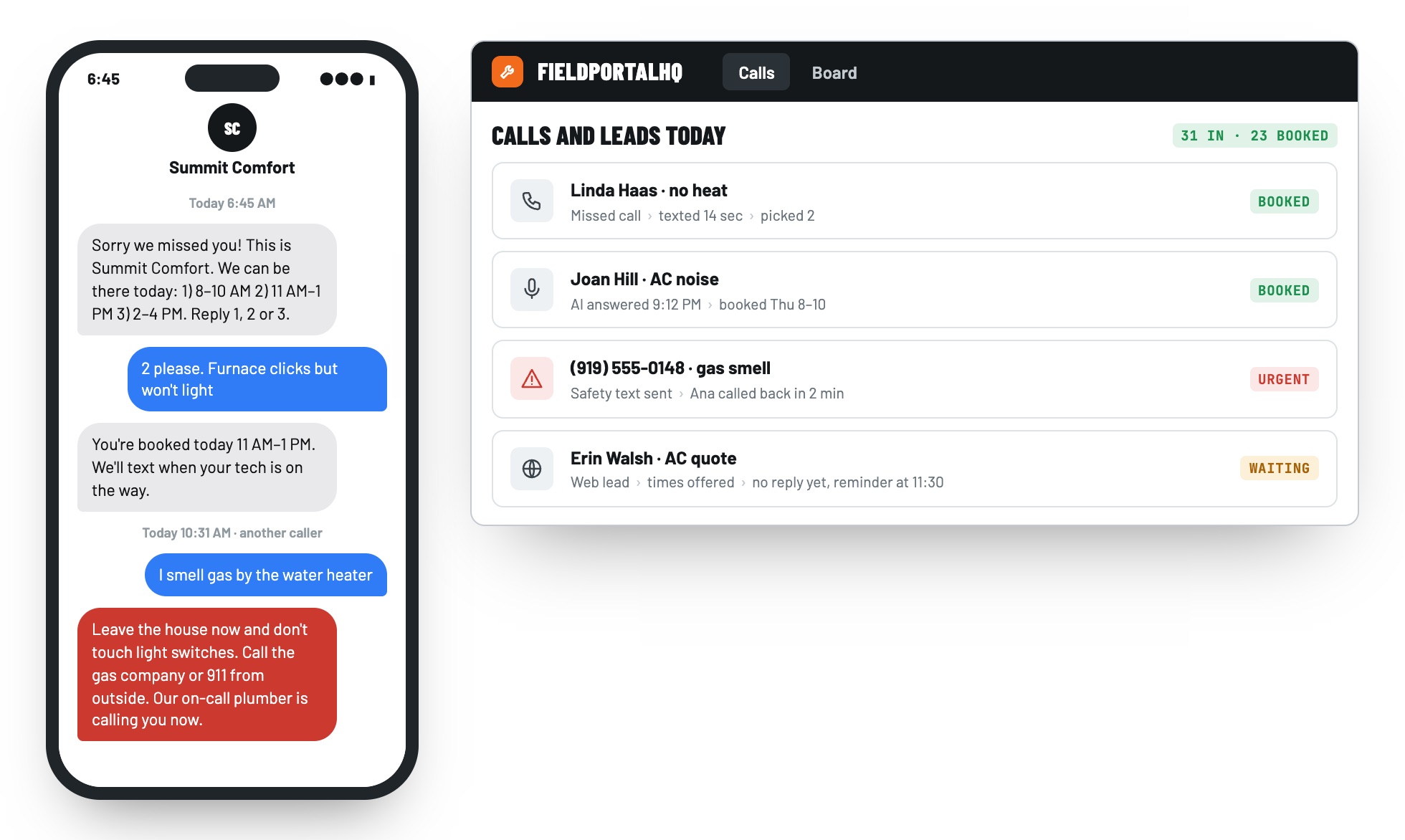
Within 30 seconds the caller gets a text from your shop with two or three real openings. They reply 1, 2 or 3 and the job is on the board. Known customers are greeted by name.
AI phone answering, if you want it
After hours, or when nobody picks up, an AI voice answers in your shop's name, asks what's wrong and books a real time. You choose when it answers, and you get the recording and a summary.
Urgent calls go to a person
Gas smell, sparks or water pouring in: the caller gets safety steps right away and your on-call tech's phone rings.
One inbox for every lead
Calls, texts, web forms and lead-service emails land in one thread per customer, with the source attached. When someone in the office replies, the automation steps back.
Why it mattersMost callers try the next shop within minutes. Every one you text back first is a job you already paid for in ads.
Dispatch: the right tech, with the reasons
A new no-heat job lands on the board. Instead of guessing who's closest, your dispatcher sees the best three techs and why.
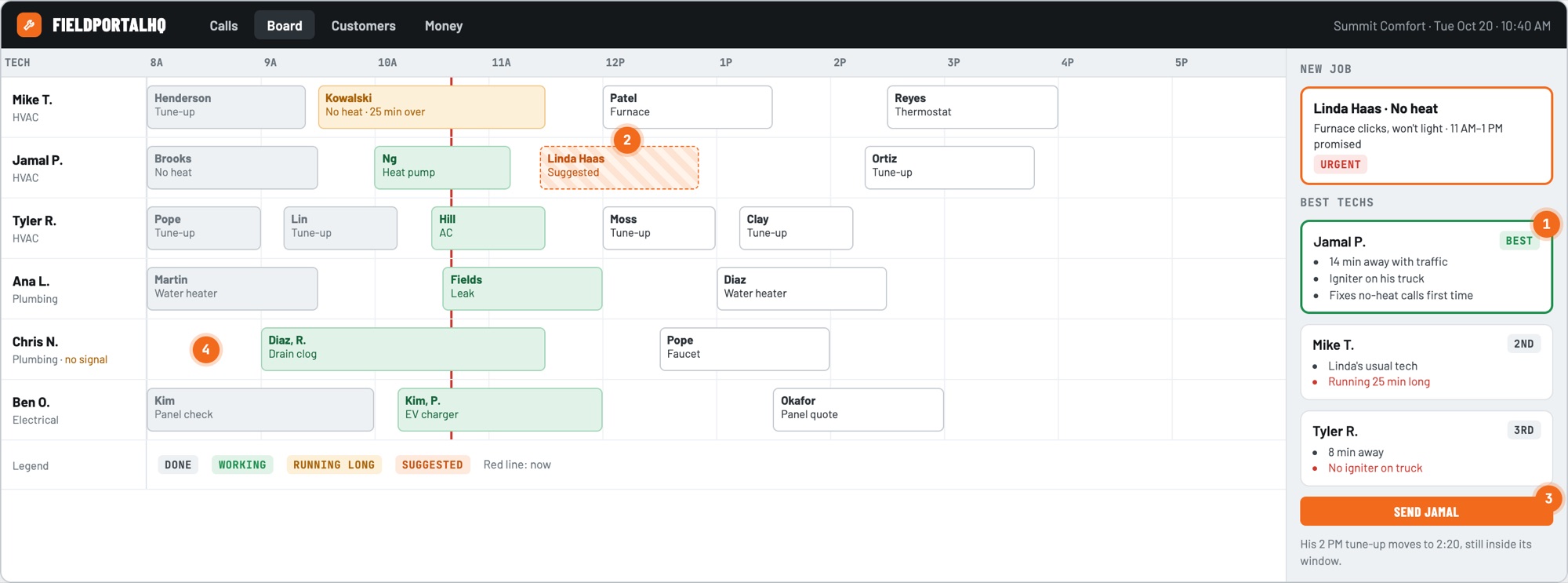
- Best tech, in plain words. Ranked by drive time with traffic, trade and skill, the parts on the truck and the customer's favorite tech, so you know who can actually fix it today.
- See it before you set it. The suggested job shows on the tech's row, so you see how it fits the rest of the day.
- You decide. Nothing is assigned until someone clicks. Drag any job to any tech to override.
- Signal status. When a tech's phone has no signal, the board says so, so you call instead of waiting.
It also handles: running-late alerts with a one-tap updated-time text, sick-day re-plans that never move a promised window on their own, two-tech and multi-day jobs, arrival windows for customers and exact times for you, and techs who are licensed for only one trade. A one-truck shop simply sees the day in route order.
On the way and on site: a tech app that works in a basement
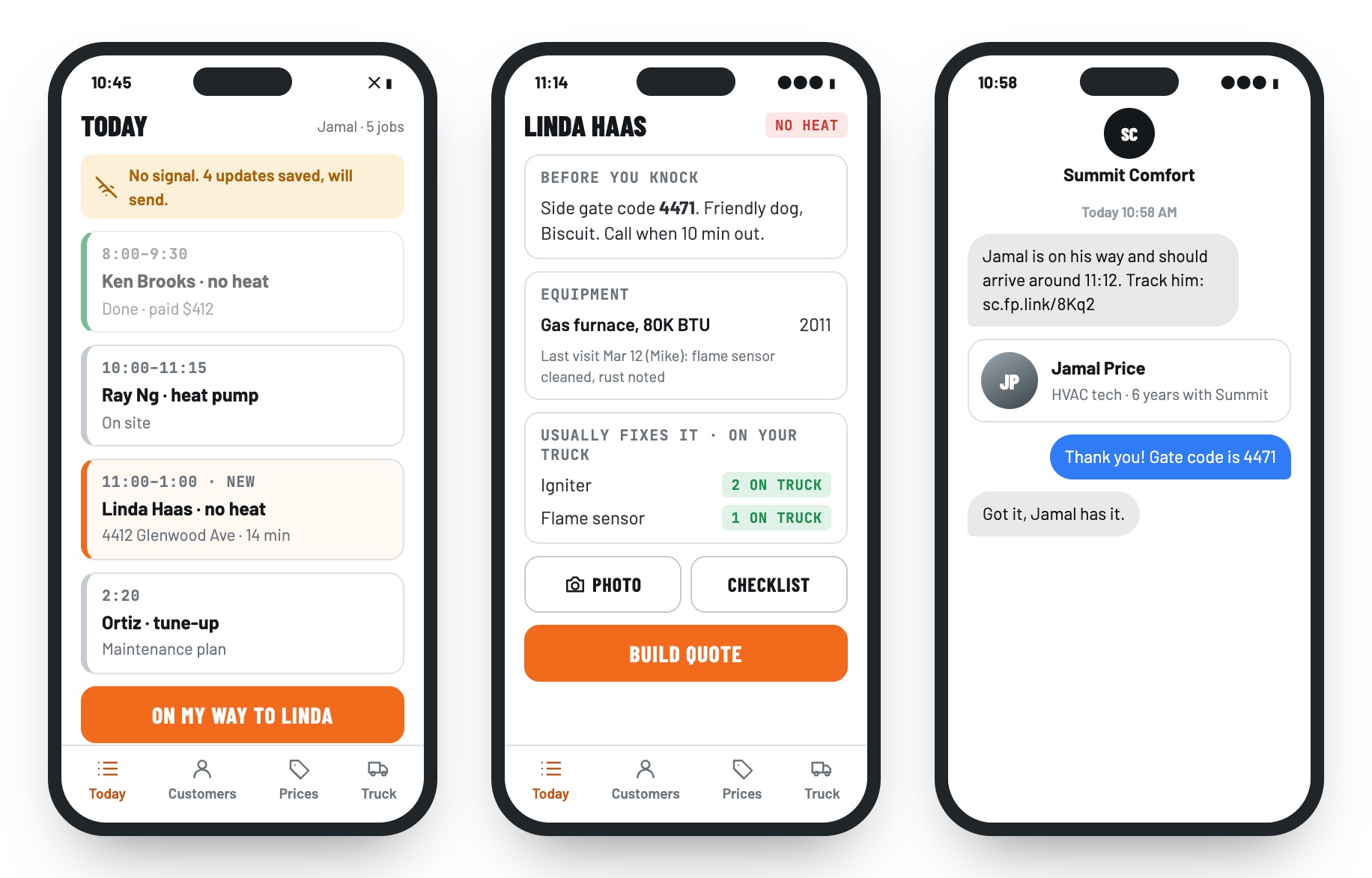
The tech taps On my way, the customer gets the tech's photo and arrival time, and everything the job needs is on one screen, with or without bars.
The whole job works offline
The day's jobs, customer notes, equipment and prices are saved on the phone. A tech can finish the job from arrival to signed invoice with no signal, and updates send when it comes back.
History at every address
Equipment, past visits, photos and notes like gate codes and pets, so every tech walks in knowing what the last one found.
Customer texts, sent for you
Booking confirmation, a reminder the day before, On my way with the tech's photo and a tracking link, and a review request after payment.
Made for the field
Fast screens, big buttons that work with gloves, photos with markup, checklists, and a time clock that tracks location only while a tech is clocked in.
Why it matters"Is anyone still coming?" calls disappear, and techs stop driving back to the shop to look something up.
Quote with options and get paid on site
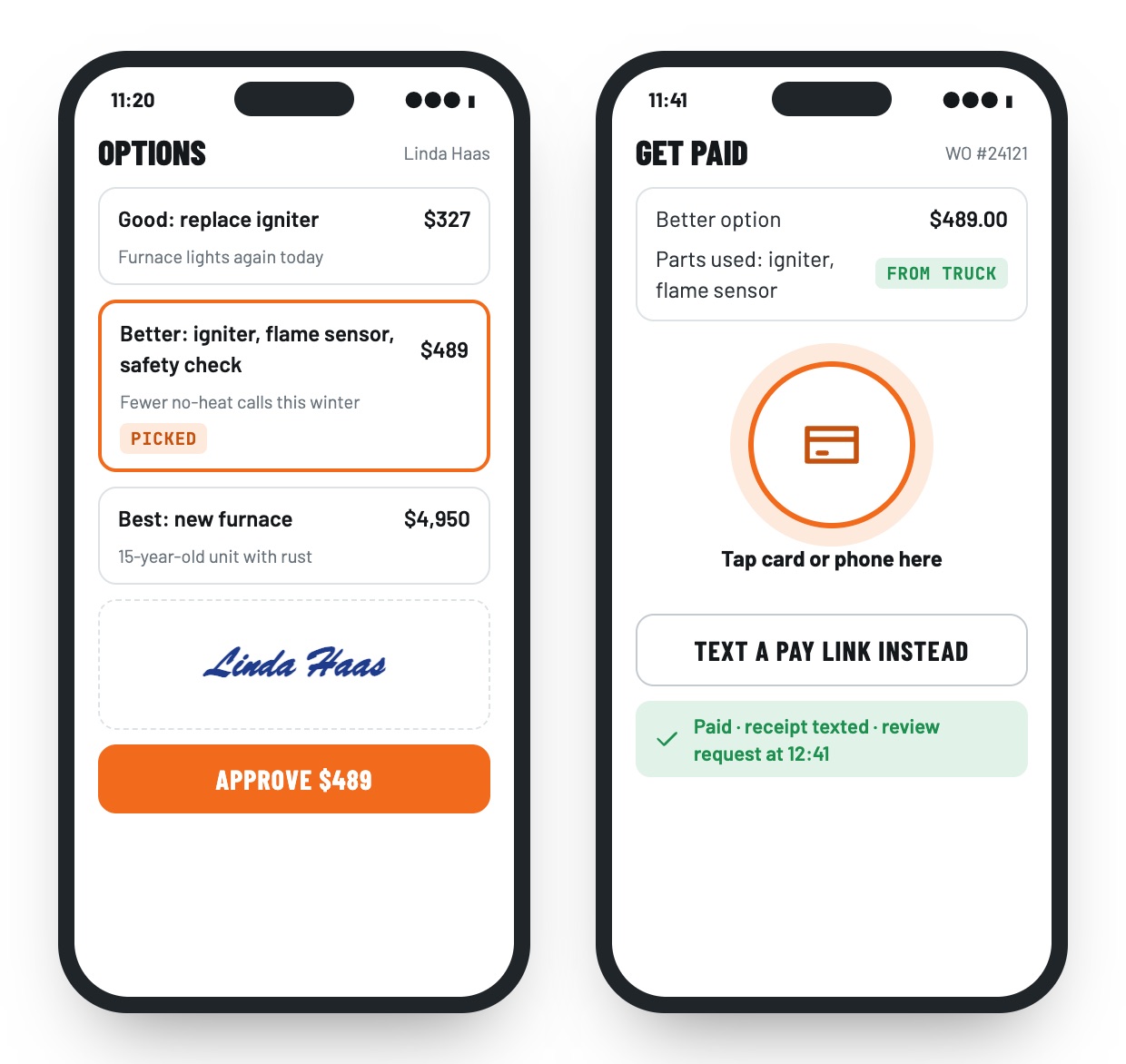
The igniter is bad. The tech shows three options on the phone, the customer picks one and signs, and payment is collected before the truck leaves.
Good, better, best
Options built from your price list, in words a homeowner understands. The customer signs on the tech's phone, or later from a text link.
Invoices that fill themselves
The work done and parts used become the invoice. Tap to pay on the phone or text a pay link, and payments sync to your accounting software.
Your price list, ready on day one
Start from a ready-made HVAC, plumbing or electrical price list and make it yours: labor and parts per task, with photos and plain descriptions.
Why it mattersOptions raise the average ticket, and collecting at the door means no chasing invoices at the end of the month.
Tomorrow: the right parts on the truck, and the numbers on your phone
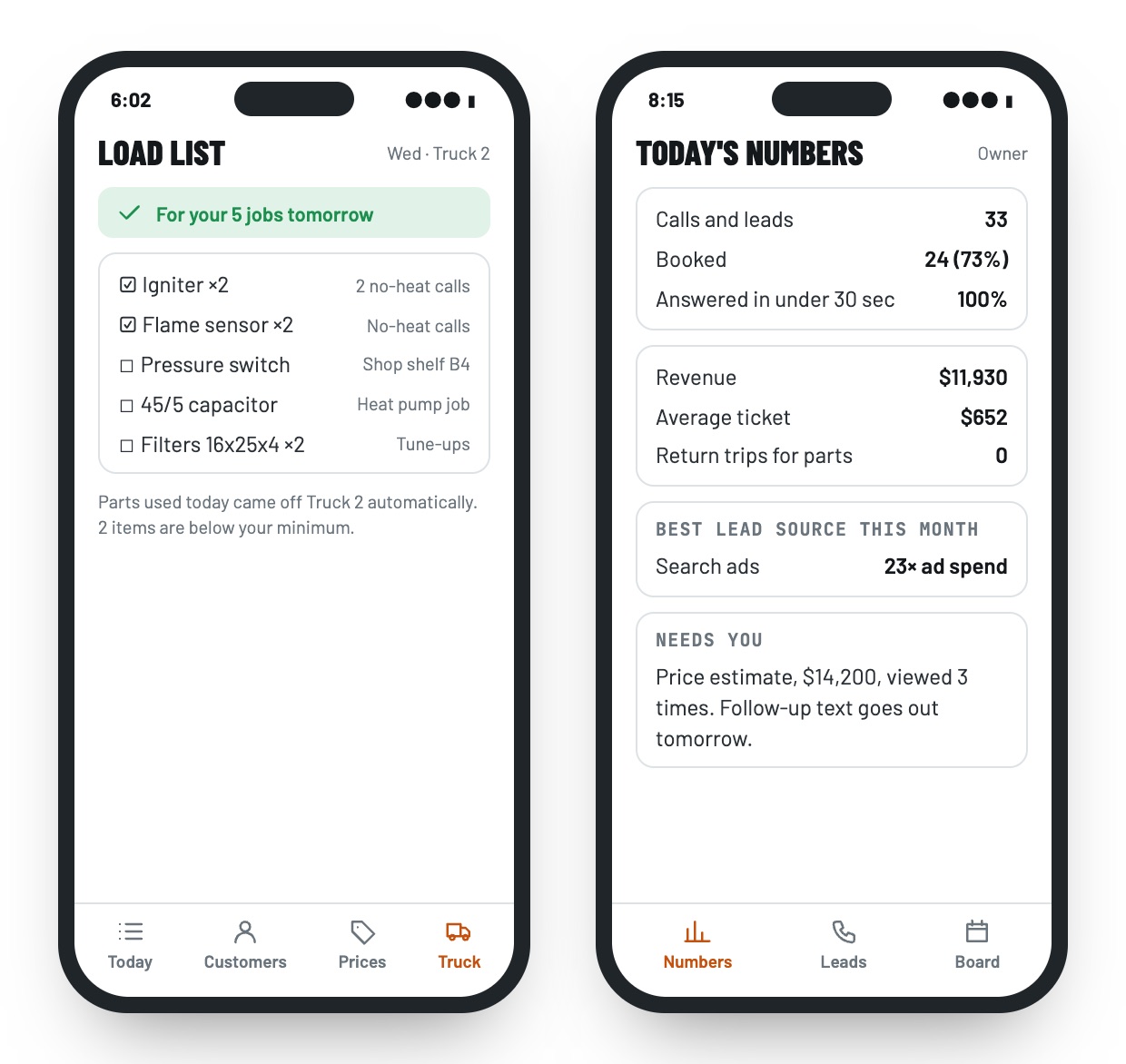
Each evening every tech gets a list of what to load for tomorrow's jobs. The owner sees how the day went from the couch.
Truck stock and a nightly load list
Every truck has its own stock, and parts used come off it automatically. Each evening FieldPortalHQ compares tomorrow's jobs with what's on board and lists what to grab. Refrigerant is tracked by weight for your records.
Owner numbers that answer money questions
How many calls became jobs, which ads pay back, who closes, which jobs cause callbacks and what each job type really earns, plus a Monday summary by email.
Maintenance plans
Sell yearly tune-up plans, bill them monthly, and get a list of members who are due so you can fill slow weeks.
Why it mattersEvery trip back to the supply house is an hour nobody pays for.
A contractor website that fills your board
This is where we have a head start: we've built websites for small businesses since 2006. Your FieldPortalHQ site is designed by us for your trades and your service area, and every button on it feeds the system behind it.
- Book a service shows real openings from your board, not a "we'll call you back" form.
- Request a quote lands in your lead inbox, with where it came from.
- Click-to-call numbers show which ads and pages bring in jobs.
- Service area pages, financing, maintenance plans and reviews, built to rank in local search.
- An emergency banner for gas, water and no-heat calls.
- Keeping your current site? Add the Book button to it, and to your Google profile.
It suggests. You decide.
FieldPortalHQ uses AI only where it saves real time, and it never takes the wheel. Dispatch suggestions come with their reasons, and nothing is assigned without a person.
- Phone answering books real times, and you choose when it answers.
- Tech shorthand is rewritten into customer-friendly notes, shown for approval.
- Data plates and supply-house receipts are read from a photo, and the tech confirms.
- Your data stays yours. It is never used to train AI models, and each feature can be turned off.
Your shop shapes it. We build it.
FieldPortalHQ isn't a box you squeeze your shop into. We start with how you already work, set it up around your trades, prices and people, and keep building it with you. Shops that start with us have a real say in what comes next.
- We learn your shopWe ride along with a tech, sit with whoever answers the phones, and look at last week's calls and jobs. That tells us what to set up first.
- We set it up your wayYour price list, job types, parts kits, service area, arrival windows and text wording. We move your customers, equipment and open jobs from your current app for free.
- You try it side by sideFor the first 30 days, your missed calls run through FieldPortalHQ while everything else stays the same. You see the jobs it saves before you switch anything else.
- We keep building it with youA named contact, regular check-ins and a real voice in what we build next, whether that's maintenance plans, Spanish, financing or whatever your shop needs most.
Why you can count on us
We've designed and built websites, client portals and custom applications for small businesses since 2006, and we stay with our clients long after launch. See our work.
- A 30-day results report: missed calls answered, jobs booked from them, drive time saved
- Month to month, with no contract
- Export all of your data any time, no ticket needed
- Early shops lock their price for 12 months
Between the simple apps and the big systems
Simple scheduling apps charge per user and sell the important parts as add-ons. The big systems are powerful, but come with contracts, setup fees and months of rollout. FieldPortalHQ gives a 1 to 20 tech shop the smarts without the weight.
| Per-user scheduling apps | Big enterprise systems | FieldPortalHQ | |
|---|---|---|---|
| Price | Per user, with key features as add-ons | Per tech, usually a yearly contract plus setup fees | One price for the whole team, month to month |
| Missed calls | Answering is often an add-on | Call center tools at extra cost | A text with real times in 30 seconds, plus optional AI answering |
| Dispatch | Drag and drop | Powerful, with a long learning curve | The best tech suggested with reasons. You decide. |
| No signal | Varies | Varies | The whole job works offline |
| Parts | Basic inventory | Full inventory | A load list for every truck, every evening |
| Website | Template builder or add-on | Separate vendor | Designed by us, booking into real openings |
| Getting started | Set it up yourself | Months of rollout | We move you, with 30 days side by side |
| Your say | A feature request form | A feature request form | You help decide what we build next |
Your shop runs on it every morning, so it's built that way
Your data stays yours
Every shop's data is kept separate and encrypted, and you can export all of it any time.
Texting done by the rules
Your shop is registered for business texting, opt-outs are honored instantly, and follow-ups respect quiet hours.
Techs see what they need
Costs and margins stay off tech phones by default, and a lost or retired phone can be wiped remotely.
Location only on the clock
A tech's location is recorded only while they're clocked in, and the app tells them so.
Records that hold up
Price changes, discounts and voided invoices are logged, and refrigerant use is recorded by weight, tech and job.
Backed up, in the US
It runs on Google Cloud in the US with continuous backups, and the tech app keeps working even during an outage.
One price for the whole shop
Unlimited users on both plans, so adding techs for the summer doesn't grow your bill. Month to month. Talk to us and we'll recommend the plan that fits your shop.
Essentials
$
For shops with 1 to 5 techs.
- Missed-call text-back and urgent call alerts
- Dispatch board and the offline tech app
- Quotes with options, invoices and payments on site
- Customer texts and owner numbers
- Unlimited users
Pro
$$
For shops with 5 to 20 techs.
- Everything in Essentials
- AI phone answering
- Best-tech suggestions on the board
- Truck stock and nightly load lists
- Maintenance plans and deeper owner reports
Contact us to talk through your shop. The value is significant, and the price is surprisingly low.
FieldPortalHQ questions, answered
Is FieldPortalHQ priced per user?
No. Both plans include unlimited users: techs, office staff, owners and summer hires. You pay one monthly price for the shop, month to month.
Can we keep our phone number?
Yes. Your published numbers forward through FieldPortalHQ to your existing line, so every missed call is caught within seconds and every lead is tied to the ad or page it came from.
Does the tech app work without cell signal?
Yes. The day's jobs, customer history, equipment and prices are saved on the phone, so a tech can finish the whole job in a basement or crawlspace. Updates and customer texts go out when signal returns.
Does the AI assign jobs or talk to customers on its own?
Dispatch only suggests: nothing is assigned until someone in your office clicks. AI phone answering is optional, and you choose when it answers. Notes and other AI-written text are shown to a person before they reach a customer.
Can it handle a shop that does more than one trade?
Yes. Each tech has their trades, skills and licenses on file, and dispatch only suggests techs who can do the job. You get a warning before a license expires.
Can you move us off our current software?
Yes, for free. We import your customers, equipment, price list and open jobs. For the first 30 days your missed calls run through FieldPortalHQ while everything else stays the same, so you see the results before you switch.
Can we shape how it works?
Yes, and we want you to. We set it up around your prices, job types and workflow, and shops that start with us have a real say in what we build next. You'll have a named contact the whole way.
Do our customers need an app?
No. Customers book, track the tech, approve quotes, pay and leave reviews from text and email links that work on any phone.
How much does it cost?
There are two plans, Essentials and Pro, set by the size of your shop, both with unlimited users. Contact us to talk through your shop and we'll recommend the right one. The value is significant, and the price is surprisingly low.