
Spend tax season on returns, not on chasing clients.
Small firms lose hours to document chasing, "is my return done?" calls and tools that don't talk to each other. FirmPortalHQ is the practice management solution we build around your firm: your website, client portal and the firm's work in one place, tailored to how you work, with you shaping what comes next.
- 1front door: your website, portal and app are the same product
- 0passwords for your clients to forget
- 1flat price for the firm, with no per-seat fees
- ~3weeks to launch, and we do the move for you
Tax season shouldn't run on chasing documents and juggling logins
Small CPA and tax firms tell us the same things: too many hours chasing clients, too many tools that don't talk, and clients who give up on the portal and email their documents instead.
-
The challenge
Clients juggle separate logins
A website from one vendor, a portal from another, and a password nobody remembers. So clients email tax forms, Social Security numbers and all.
How we solve itOne front door, no passwords
Your website, client portal and app are the same product under your brand, and clients sign in with a text link or Face ID.
-
The challenge
Tax season is spent chasing
Staff spend afternoons on reminder calls and "is my return done?" questions instead of preparing returns.
How we solve itChecklists that chase for you
Each client gets a checklist built from last year, reminders go out on their own, and a tracker shows clients where their return stands.
-
The challenge
The tools don't talk to each other
Documents, e-sign, billing and deadlines live in different places, so the same thing gets typed again and work slips through the cracks.
How we solve itOne system where client actions move the work
When a client uploads, approves or pays, the job moves forward on your board without anyone re-keying it.
-
The challenge
Per-seat prices and painful switching
Bills grow with every hire, and moving to something better looks like months of work.
How we solve itOne price for the firm, and we do the move
A flat monthly price for the whole firm, and we move your website, files and client list in about three weeks.
Highly customizable, with you shaping the roadmap
No two firms work the same way, so we don't ask you to change how you work. We tailor FirmPortalHQ to your firm, build what's missing, and as we go, you have a real say in what comes next.
Set up the way you work
Your workflows, templates, wording, brand and settings. We configure FirmPortalHQ around your firm instead of the other way around.
Built for your specific needs
Need something that isn't there yet, a custom report, a special workflow or a connection to a tool you rely on? We design and build it with you.
You influence the roadmap
A named contact, regular check-ins and a direct line into what we build next. Your priorities help decide what comes first.
One system, three places it shows up
Most small firms run a website from one vendor, a client portal from another, and a practice tool and a spreadsheet behind them. FirmPortalHQ is all of it in one product, under your firm's name.
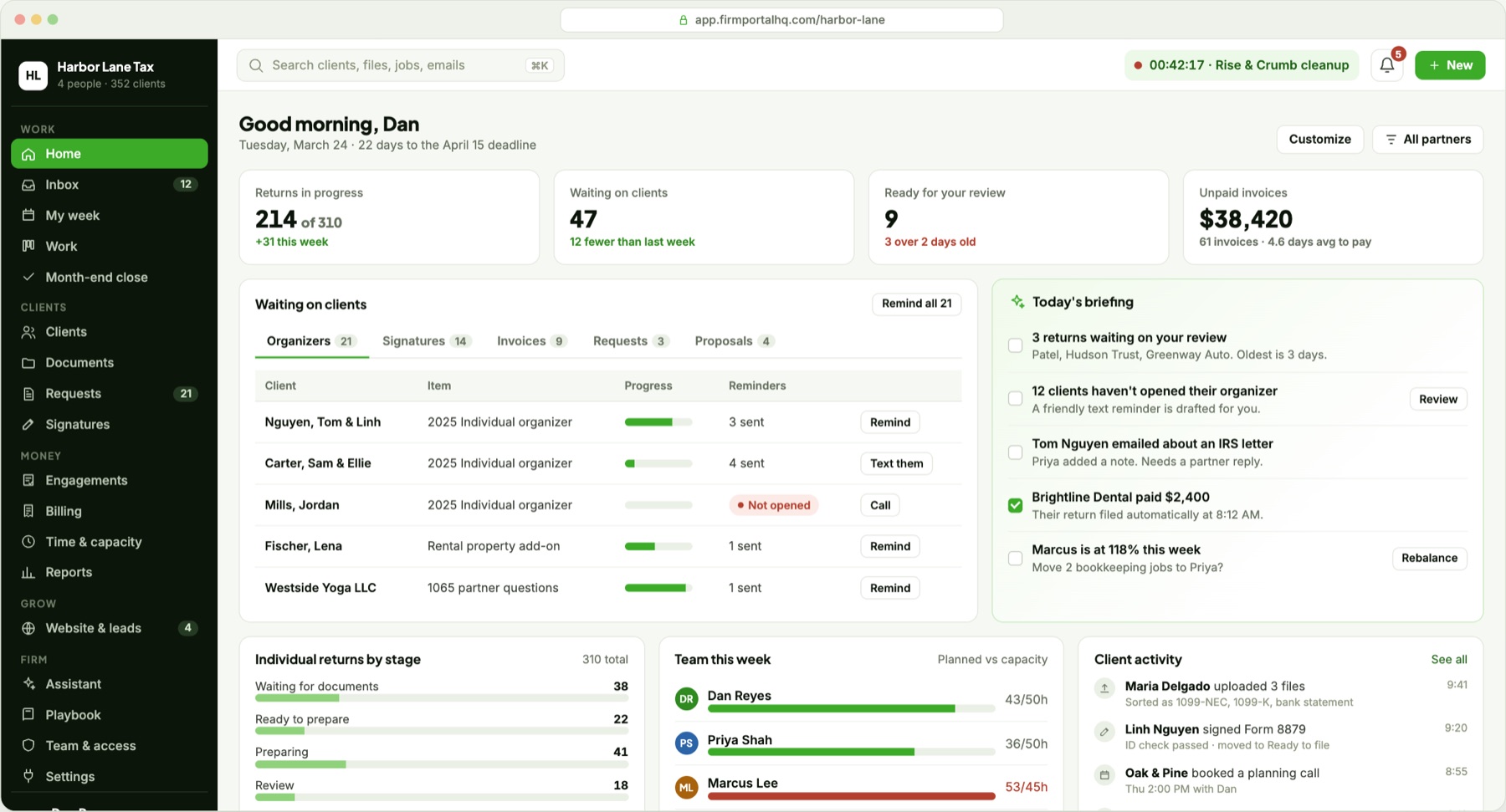
Your website
Where new clients find you and existing clients start.
- Book a call on real openings
- Upload documents from the home page
- Pay an invoice without logging in
- Client login on your own domain
Client portal and app
Where clients do their part, on a laptop or a phone.
- Sign in with a text link or Face ID
- Upload everything at once, or follow a checklist
- Scan, upload, approve and pay
- See where their return stands
Your firm's workspace
Where your team works, all season and all year.
- Every job on one board
- A shared inbox for email, messages and texts
- Client records, documents and billing
- Reports, time and team capacity
What connects them: everything a client does moves the work on your side, with nobody re-keying it.
- A client uploads their last W-2 from their phone.
- It's recognized, renamed and filed, and their checklist is complete.
- The job moves to "Ready to prepare", and the reminders stop.
- Your preparer sees it on the board, with everything in one place.
Tax season, from your client's side
Take a typical client: a small-business owner who does everything on her phone. Here's her tax season today, and with your firm on FirmPortalHQ.
Finds where to start
Today: a separate portal link, and a login page under another company's name.
With FirmPortalHQ: "Upload my documents" right on your homepage.
Opens her checklist
Today: creates a password and waits for an emailed code.
With FirmPortalHQ: taps the link in your text. Face ID after that.
Sends her documents
Today: emails attachments in batches, or drops files into an empty folder and hopes it's everything.
With FirmPortalHQ: uploads everything in one go, or scans paper forms with her phone. Each file is recognized and filed, and a checklist built from last year's return shows anything still missing.
Asks a question
Today: emails a photo of a tax form, Social Security number and all.
With FirmPortalHQ: messages her preparer securely, right next to the document.
Approves and pays
Today: two tools, two emails, two logins.
With FirmPortalHQ: what needs her signature and the invoice sit on the same to-do list.
Waits for her return
Today: calls the office to ask.
With FirmPortalHQ: a tracker like a parcel delivery, from received to filed, with an alert at each step.
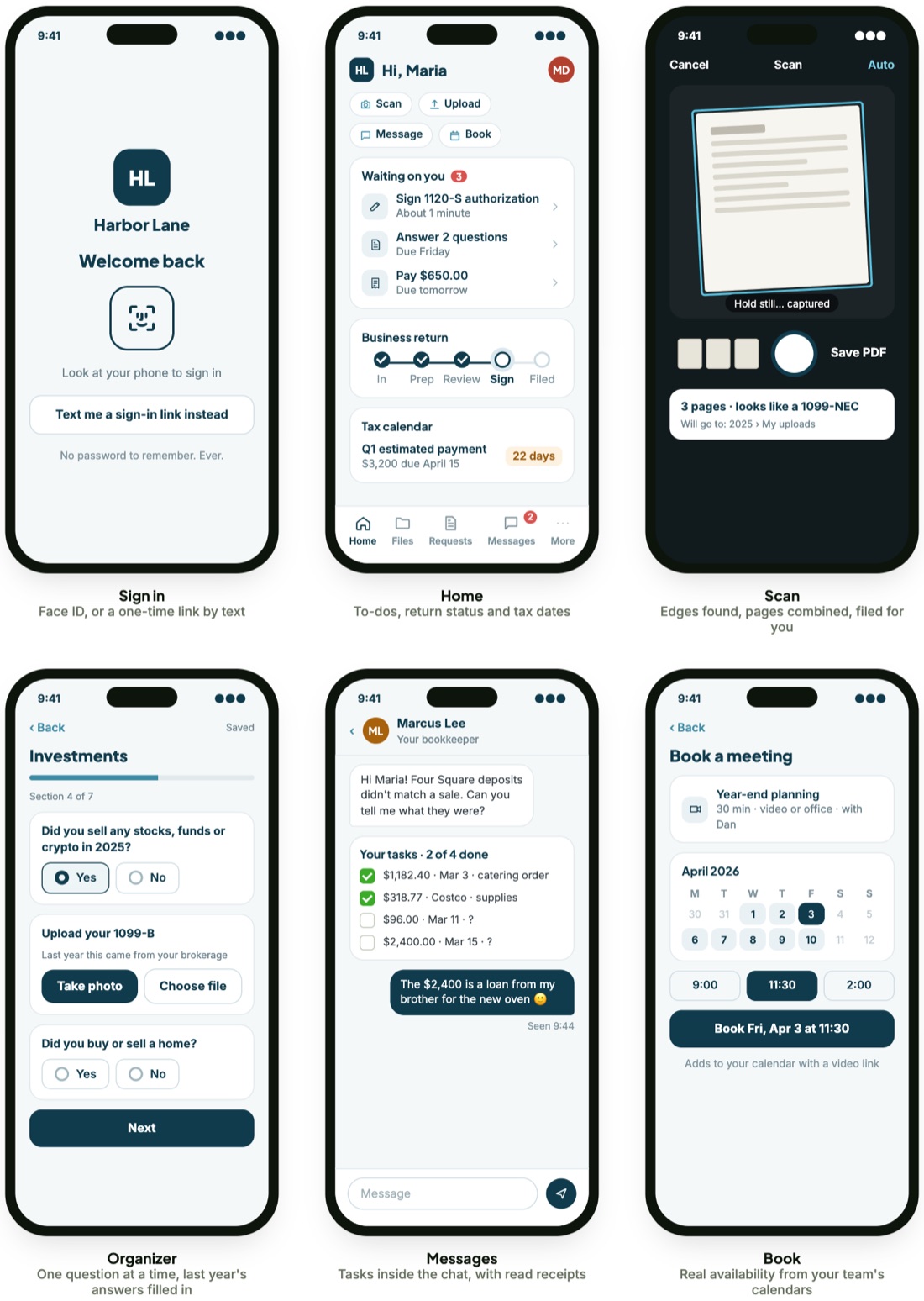
Clients send documents their way. Every way works.
Nobody has to fill out a questionnaire before sending you anything. Most clients simply upload everything at once, some like to be guided, and some still bring a folder of paper to your office. Whichever they choose, each document is recognized, named and filed to the right client and year, and the checklist ticks itself off.
Drop it all in one go
From the portal, the app or the upload button on your website, clients send a whole stack of files at once, with no questions to answer first. If anything is still missing, their checklist shows it.
A guided organizer, if they want one
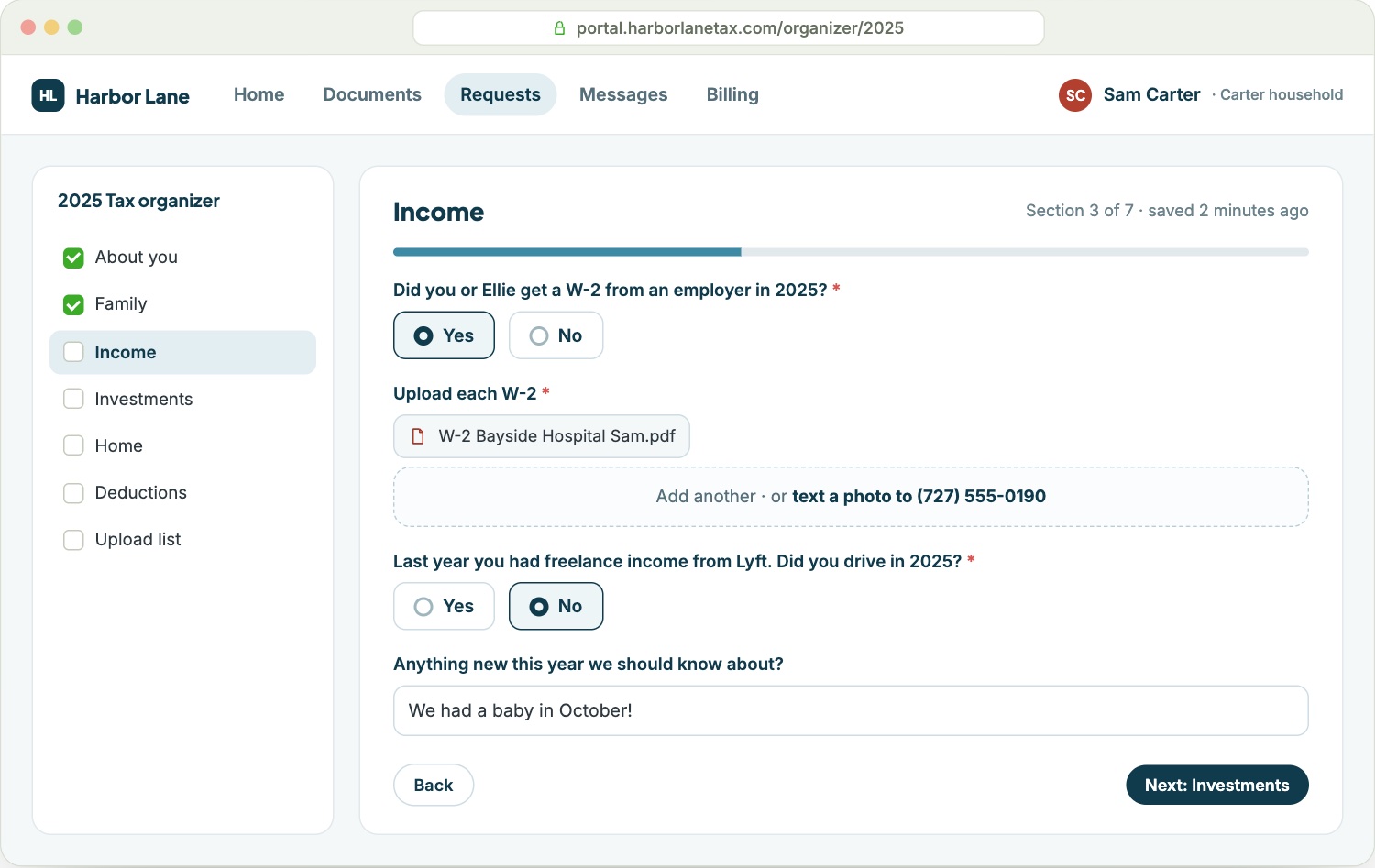
For clients who like a guide: short questions with the upload right inside each one, last year's answers already filled in, and progress saved as they go.
Bring it to the office
Paper drop-offs are fine. Your team scans the stack at the front desk, and it's sorted, filed and tracked like any other upload.
The organizer, for clients who like a guide
It's there when it helps, never a hoop to jump through. Follow-up questions appear only when they apply, and the moment a client submits, the job moves on your side.
- Opens from a text or email, no password
- Remembers last year's employers, banks and dependents
- Snap a photo or text one in
- One account for the household and their businesses
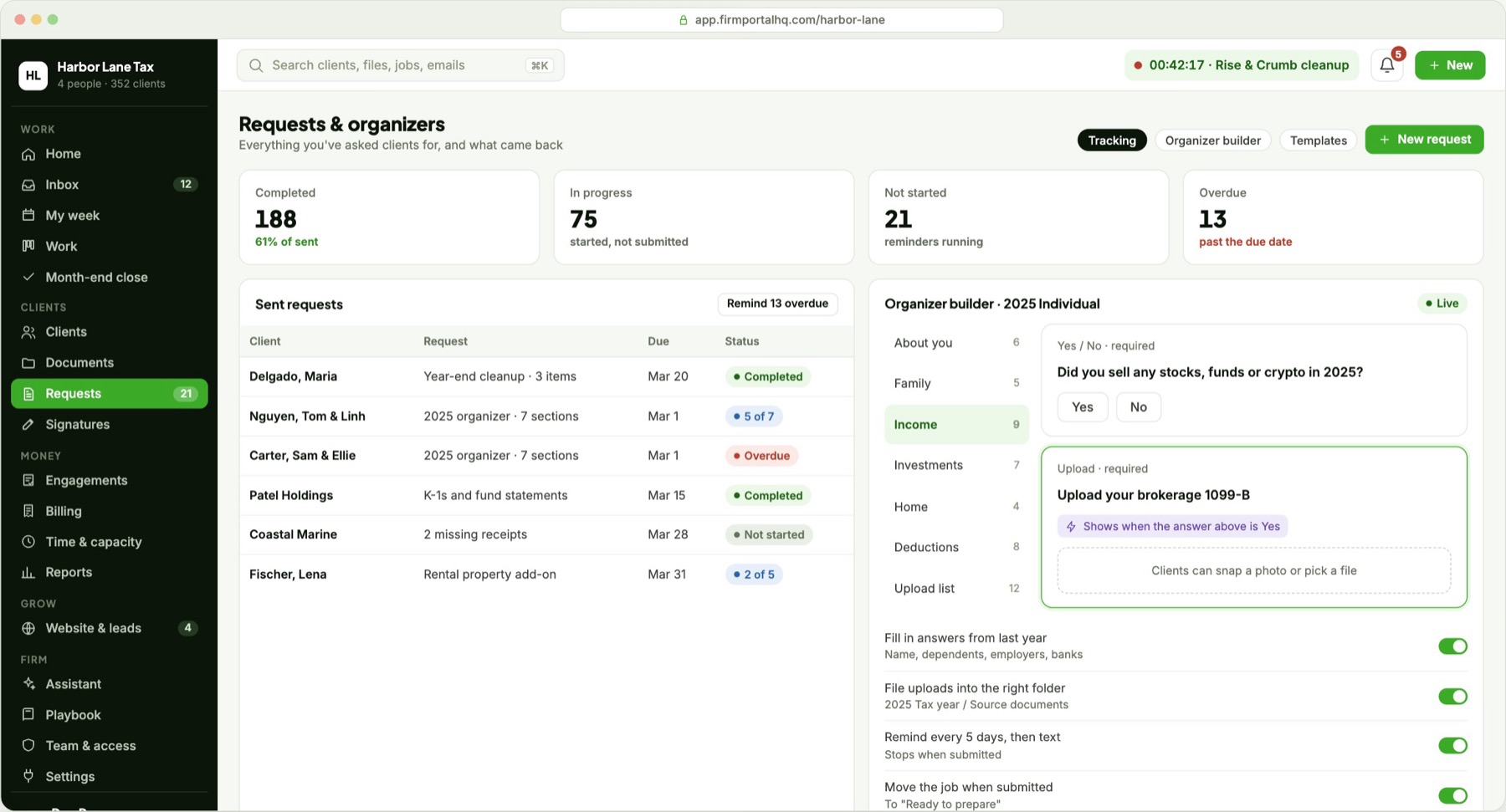
Tax season, from your firm's side
Take a four-person firm with 310 returns due April 15.
Launches
Today: a website from one vendor, a portal from another, set up by you.
With FirmPortalHQ: we build the site, move your files and import your client list. Live in about three weeks.
Requests documents
Today: one generic email to everyone.
With FirmPortalHQ: a personal checklist for each client, built from last year's documents and sent by text and email. Clients can upload everything at once, use the organizer or drop off paper.
Tracks progress
Today: opening client folders one by one.
With FirmPortalHQ: a season board showing who hasn't started, who's in progress and who's ready.
Chases clients
Today: an afternoon of reminder calls.
With FirmPortalHQ: one click texts everyone what they still owe, and repeats every 5 days until they send it.
Gets the signature and the fee
Today: a separate e-sign request and a separate invoice.
With FirmPortalHQ: one request. The job moves when both are back.
Closes the loop
Today: "Is my return done?" calls.
With FirmPortalHQ: marking it filed updates the client's tracker and schedules next year's checklist.
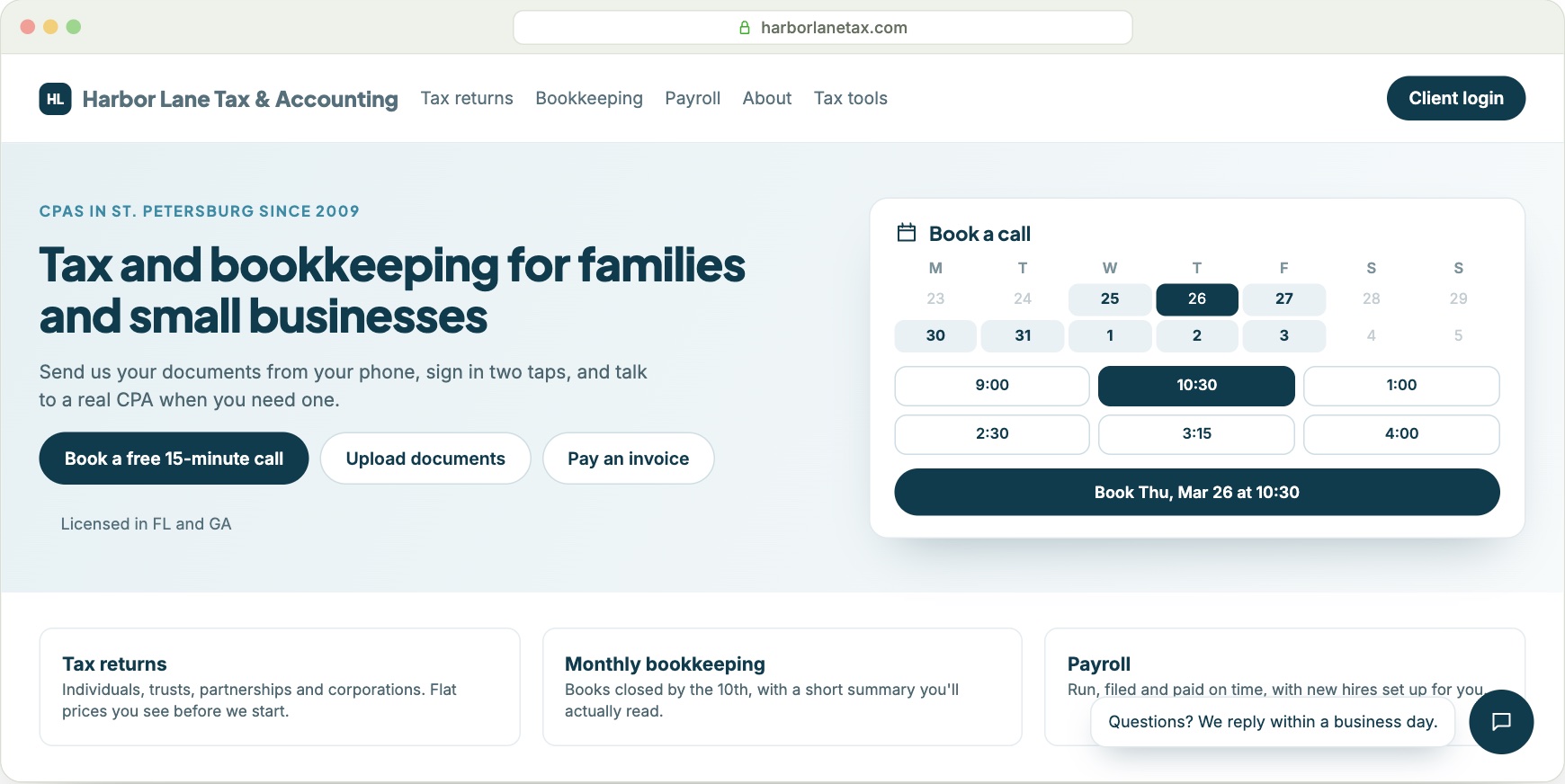
A real firm website, wired into everything
Other practice software gives you a landing page, if anything. FirmPortalHQ includes a fast, modern website for your firm, designed by us and easy for you to edit. Every button on it connects to the back office.
- Book a call on your team's real openings. It creates the meeting and the lead.
- Contact forms land as leads, with where they came from.
- Pay an invoice without logging in.
- Upload documents from the home page, even without an account.
- Chat goes straight to your shared inbox.
- Your domain, security certificate and search basics handled. No domain yet? You get one on day one.
Everything else your firm runs, in the same place
Tax season is the loudest part of the year, not the only part. Bookkeeping, payroll clients, advisory work and billing run here too.
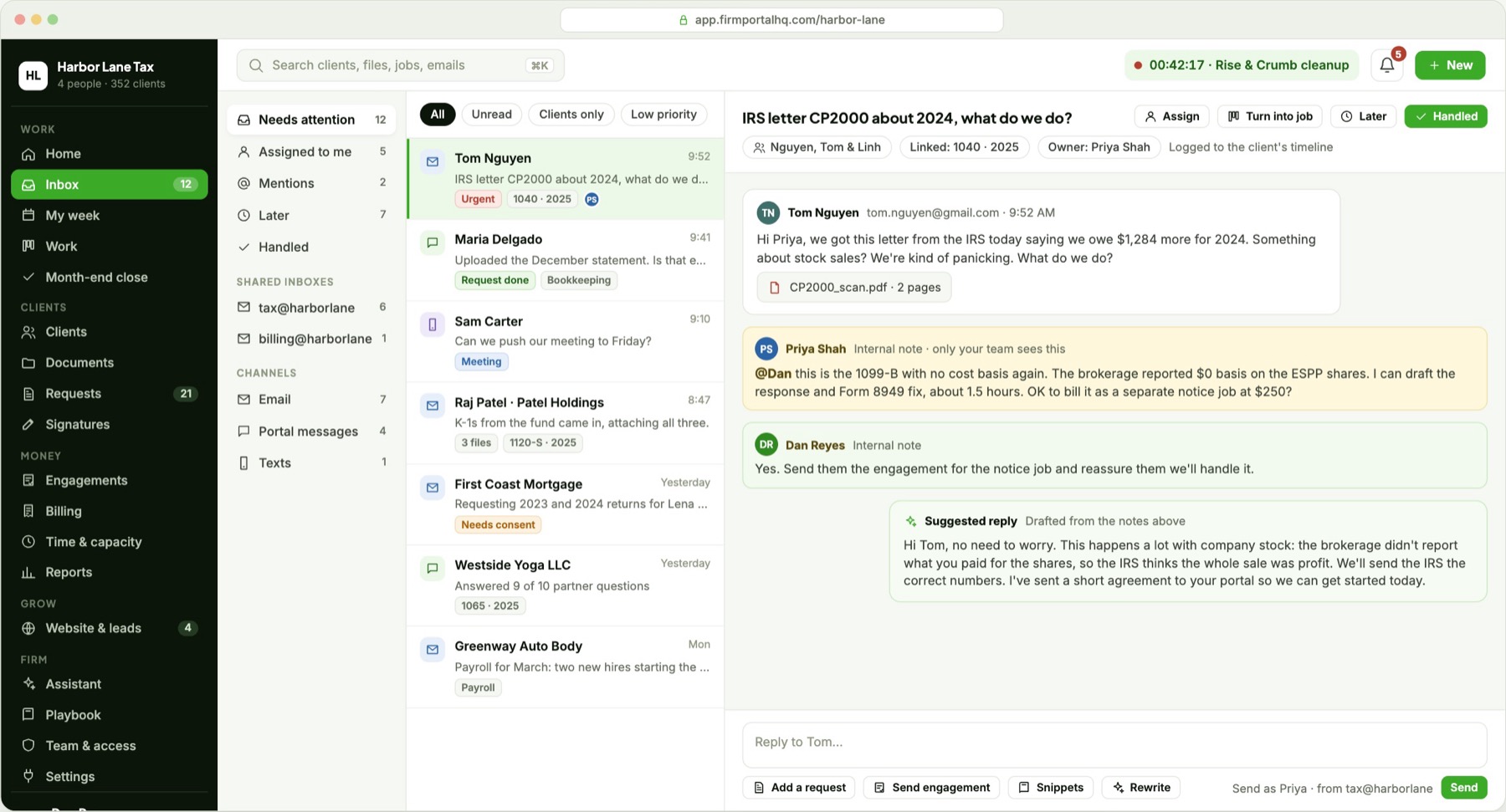
One shared inbox for the firm
Email, portal messages and texts land in one queue. Assign a conversation, leave a note your client never sees, and turn any message into a task. Everything is saved to the client's record, so nothing is lost when someone is out.
- Connects to the email you already use
- Team inboxes plus each person's own
- Attachments filed to the right client
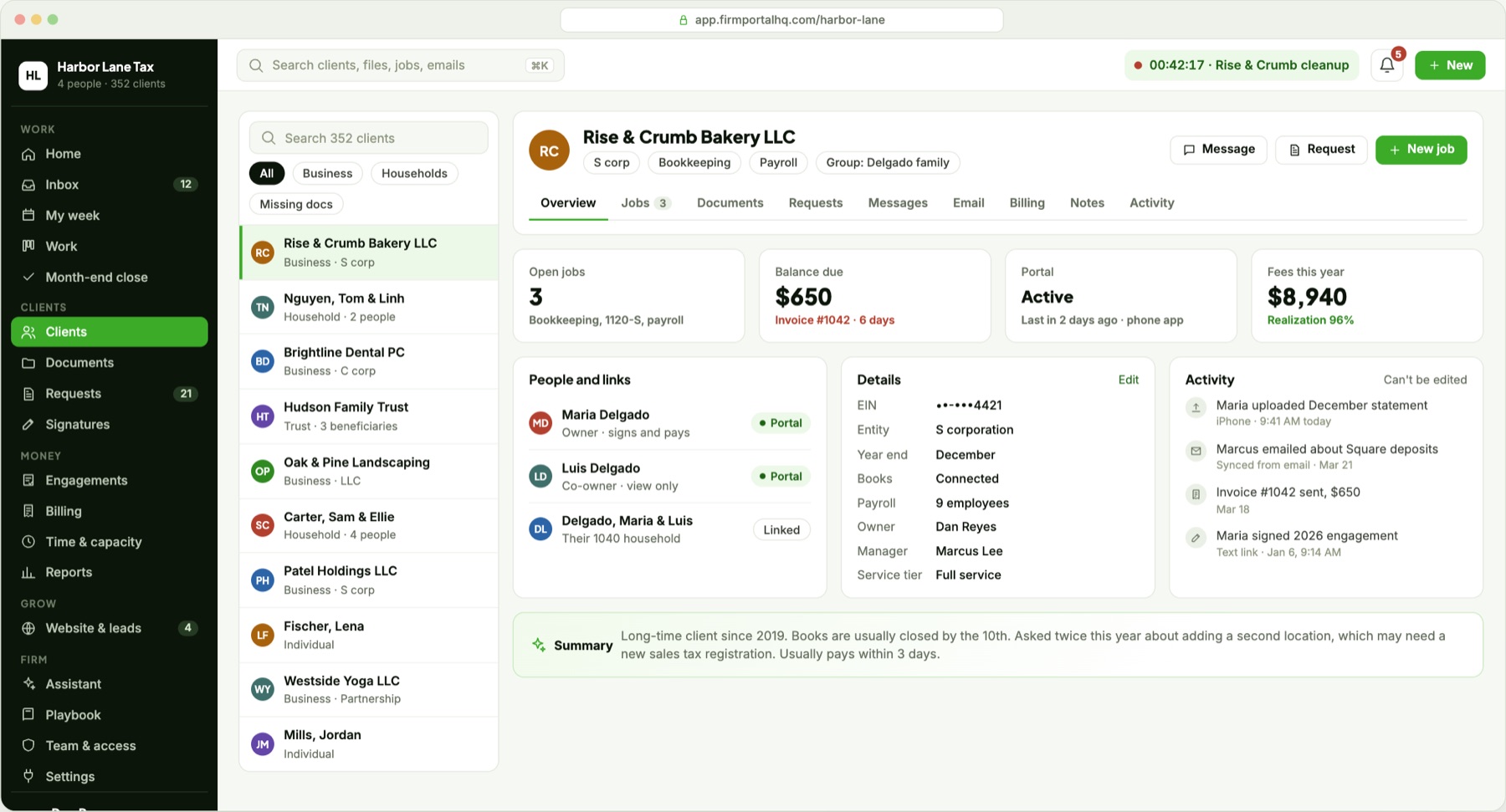
Every client, household and business on one record
People, entities, jobs, documents, requests, invoices, messages and a complete history live together. Anyone on your team can answer a client's question in seconds.
- Households and businesses linked together
- A history of every upload, signature and payment that can't be edited
- Balance and open items at a glance
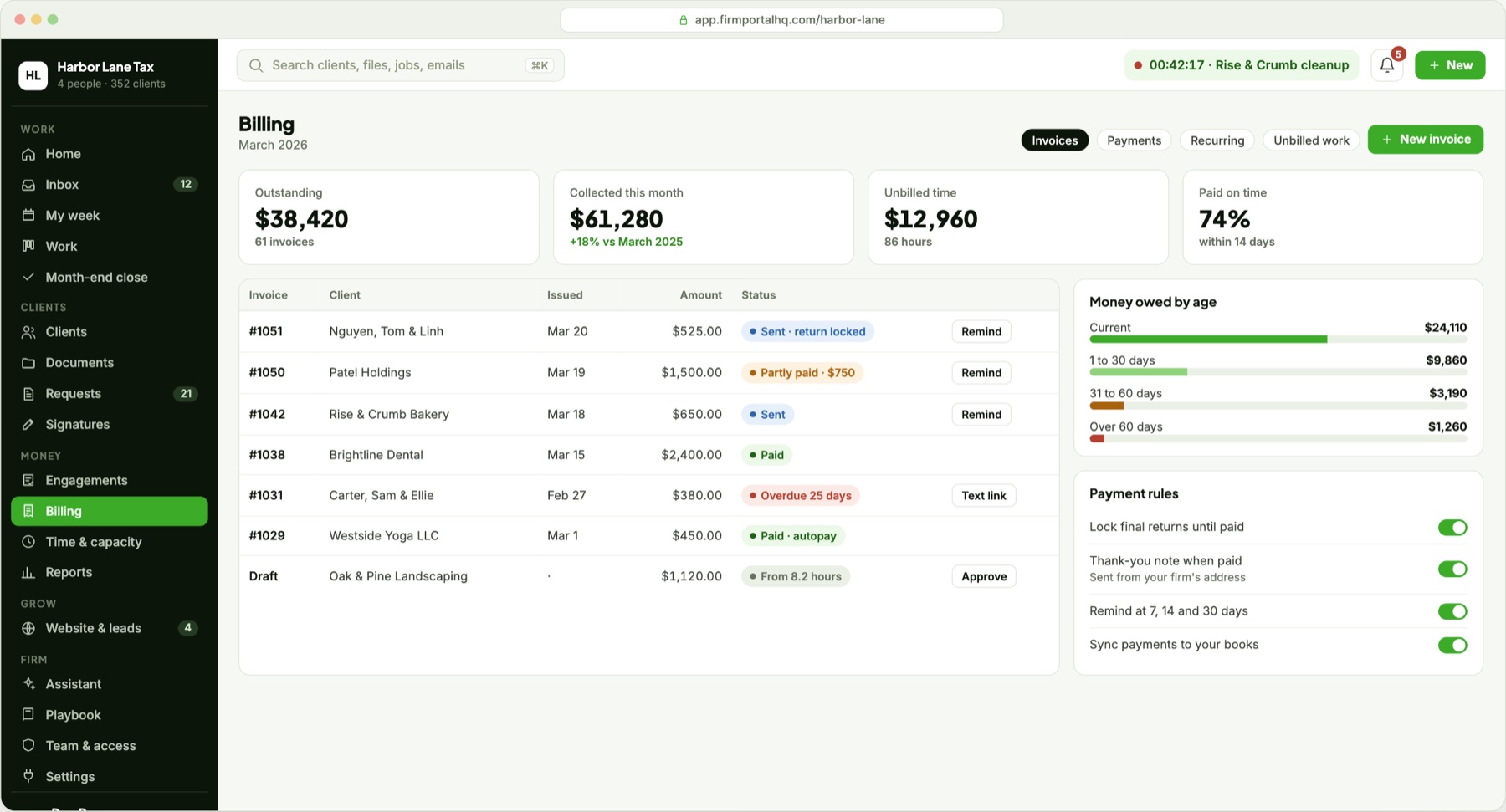
Billing that fits the way you already get paid
Send invoices, run recurring billing and see what every client owes. Clients keep paying the way they do today, through your accounting software, and payments sync back on their own. Finished returns can stay locked until the invoice is paid.
- One-off and recurring invoices
- Payments sync from your accounting software
- Automatic payment reminders and A/R aging
My week and calendar
Each person plans their week next to client bookings and deadlines.
Documents and binders
Uploads are recognized and filed on their own. A binder checklist flags what's still missing compared with last year.
Month-end close
Checks run across every bookkeeping client and show only the exceptions. Open questions go to the client as one request.
Proposals and engagements
Clients pick a package, approve the engagement letter and pay a deposit in one sitting. Approval starts the work.
Time, reports and capacity
Suggested time entries, budget against actual, revenue, realization, and who has room this week.
Team, access and playbook
Roles, client-level access and seasonal staff, plus your procedures linked to the step they describe.
Office tablet
For clients who'd rather come in: they review, sign, pay and scan at your front desk, and it clears itself after each visit.
Secure drop link
Lenders, attorneys and advisors can send you files through a secure link, no account needed.
Your own app, if you want it
Clients use the FirmPortalHQ app with your brand inside. An app listed under your firm's own name is available as an upgrade.
It drafts. You approve.
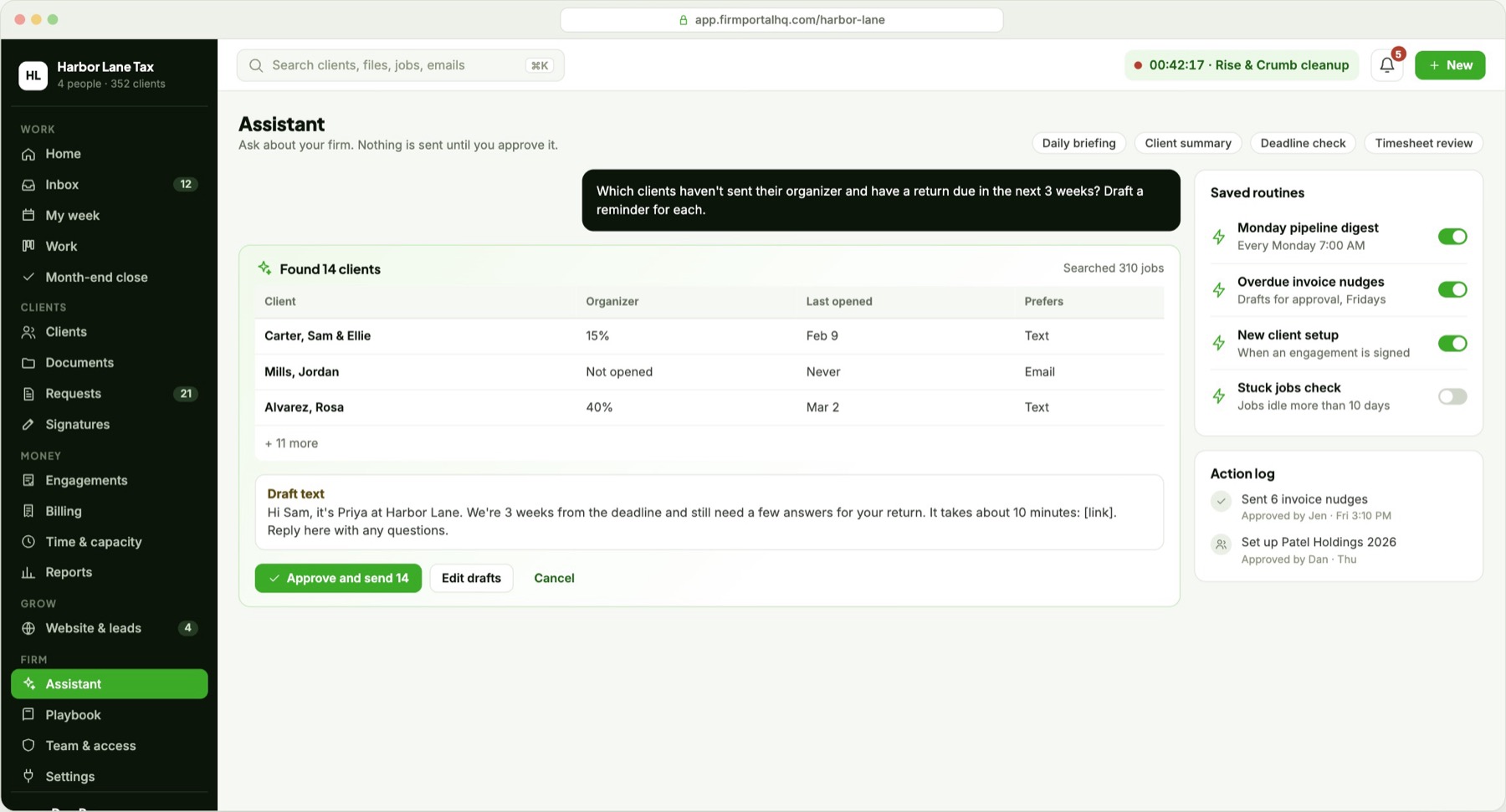
Ask in plain English, such as "which clients haven't sent their organizer and have a return due in three weeks?", and get the list with reminders already drafted. Nothing the AI writes reaches a client until someone on your team approves it.
- Sorts uploads: recognizes W-2s, 1099s, 1098s, K-1s and bank statements, and names and files them. When it isn't sure, a person confirms.
- Sees only what you can: answers use the same access as the person asking.
- Shows every recipient before a bulk send goes out.
- Your data stays private. It is never used to train AI models, and you can turn each feature off.
Built for the most sensitive data there is
Tax preparers hold Social Security numbers, bank details and full financial pictures. Security is part of the design from the first line, built around the FTC Safeguards Rule and IRS Publication 4557.
Your firm, walled off
Every firm's data is kept separate at each layer: sign-in, database and files. Your documents are encrypted with your firm's own key.
Sign-in that fits each person
Staff use two-step sign-in, and new devices must be confirmed. Clients get one-time links that expire in 15 minutes, or Face ID and passkeys, plus a fresh check before downloading a return or changing bank details.
Extra protection where it matters
Taxpayer ID numbers and bank details get an additional layer of encryption. Every upload is scanned for viruses, and download links expire within minutes.
A record that can't be changed
Who did what, when and from which device is written once and can't be edited, giving you a timeline for each client and evidence for any review.
Backed up, in the US
It runs on Google Cloud with data kept in the US, continuous backups and nightly copies to a second region. Restores are tested every quarter.
You control our access
Our support team can see your data only with your permission, for a limited time, and every visit is logged.
Keep the software you trust
You don't have to replace everything to switch. FirmPortalHQ handles everything around the return and connects to the tools that stay.
Your tax software
Returns are still prepared and e-filed where they are today. FirmPortalHQ collects the documents, tracks the work and moves the job to "Ready to file". The acceptance comes back in and updates the client's tracker.
Your e-sign tool
Engagement letters and proposals are approved inside FirmPortalHQ. Form 8879 keeps going through the e-sign service you use now, and when the signed copy comes back, the job moves on its own.
Books, payroll, email and calendars
It connects to your accounting and payroll software, and to your email and calendars, so client records, inbox and bookings stay in sync.
The website vendors don't do the work. The practice software has no website.
Small firms usually end up paying for both and asking their clients to juggle the logins. FirmPortalHQ is the one product that does both well.
| Accounting website vendors | Practice and portal software | FirmPortalHQ | |
|---|---|---|---|
| Firm website | Yes, often a template shared by many firms | Not included | Included, designed for you, with booking, upload and pay built in |
| Client portal | Usually a basic file drop | Full portal, under the vendor's look | Full portal, on your website, under your brand |
| Client sign-in | Password and an emailed code | Password and two-step codes | A text link, Face ID or a passkey |
| Document requests | Rarely | Yes | Built from last year, with reminders by text and email |
| Return status for clients | No | Sometimes | A plain tracker on the client's home screen |
| Work, inbox and billing | No | Yes | Yes, connected to the website and portal |
| Price | Tiers plus paid add-ons | Per person, per month | One flat price for the firm |
| Getting started | Pick a template | Set it up yourself, with a steep learning curve | About three weeks, and we do the move |
Live in about three weeks, and we do the heavy lifting
Your team keeps working while we set everything up. The best time to switch is between tax seasons.
- Your websiteWe design your new site or rebuild your current one, with your content, on your domain.
- Your clients and filesWe import your client list and move your documents into the right folders.
- Email and textsMessages send from your own domain, and we register your firm for business texting, which takes a few days.
- Your teamWe set up your templates and walk your team through it. Then client invites go out.
And if you ever leave, you take everything with you: a full export of your clients, documents and history.
One price for the firm
One flat monthly price for the whole firm, not a fee for each person. Every plan includes the website, portal, client app and every firm-side feature. Talk to us and we'll recommend the plan that fits your team.
Solo
$
For a CPA working alone or with one helper.
- Up to 2 team members
- Website, portal and client app
- Unlimited clients and storage
- Click-to-approve letters and proposals
Firm
$$
For firms with a small staff and a busy season.
- Up to 10 team members
- Everything in Solo
- Shared inboxes and automations
- Office tablet mode
- We move your data for you
Growth
$$$
For multi-office firms and growing teams.
- Up to 25 team members
- Everything in Firm
- Option for an app under your own name
- After-hours portal help for your clients
- A named success manager
Contact us to talk through pricing and the details for your firm. The value is significant, and the price is surprisingly low.
FirmPortalHQ questions, answered
Can FirmPortalHQ be customized for our firm?
Yes. It's highly customizable. We set it up around your workflows, wording and brand, build the features your firm needs, and you have a real say in our roadmap, with a named contact and regular check-ins.
Is FirmPortalHQ priced per user?
No. You pay one flat monthly price for the whole firm, set by team size, with no per-seat fees. Every plan includes the website, client portal, client app and every firm-side feature.
Do my clients need a password?
No. Clients sign in with a one-time link by text or email, and with Face ID or a passkey after that. One account covers their household and every business they're connected to.
Do clients have to fill out an organizer?
No. Clients can upload all of their documents in one go from the portal, the app or your website, and each file is recognized and filed for them. The guided organizer is there for clients who want it. Paper drop-offs at your office work too: your team scans them, and they're tracked like any other upload.
Do we have to give up our tax software?
No. You keep preparing and e-filing returns in the tax software you use today. FirmPortalHQ handles everything around the return: documents, requests, approvals, payments, the work board and the client's status. It also connects to your accounting and payroll software, email and calendars.
How do clients sign Form 8879?
Through the e-sign service you already use. When the signed form comes back, FirmPortalHQ moves the job forward on its own. Engagement letters and proposals are approved right inside FirmPortalHQ.
Is our clients' data safe?
Each firm's data is kept separate and encrypted with its own key. Taxpayer IDs and bank details get an extra layer of encryption, every action is recorded in a history that can't be edited, and data is backed up in the US. Staff use two-step sign-in, and our team can see your data only with your permission.
Does the AI use our data?
Only to help your team, and never to train AI models. It sees only what the person asking can see, nothing it drafts reaches a client until your team approves it, and you can turn each feature off.
How long does it take to switch?
About three weeks. We build or rebuild your website, import your client list, move your files and set up your domain, email and texting. Your team keeps working through the switch.
What if we decide to leave?
You take everything with you. You can export all of your clients, documents and history at any time.
How much does it cost?
There are three plans, Solo, Firm and Growth, set by team size. Contact us to talk through your firm and we'll recommend the right one. The value is significant, and the price is surprisingly low.
Trends in your industry
What's changing for firms, and how others are handling it.